Showing posts with label excel. Show all posts

Tuesday, December 11, 2012

Run some VBA code when excel opens

This is a very simple post describes how to run some code when excel opens.

Excel always runs a subroutine named Auto_Open() when excel opens. Simple we can use this subroutine to do the job.

Go to developer tab then click visual basic button. If you cannot locate developer tool then you can enable developer tab by looking into the image below-
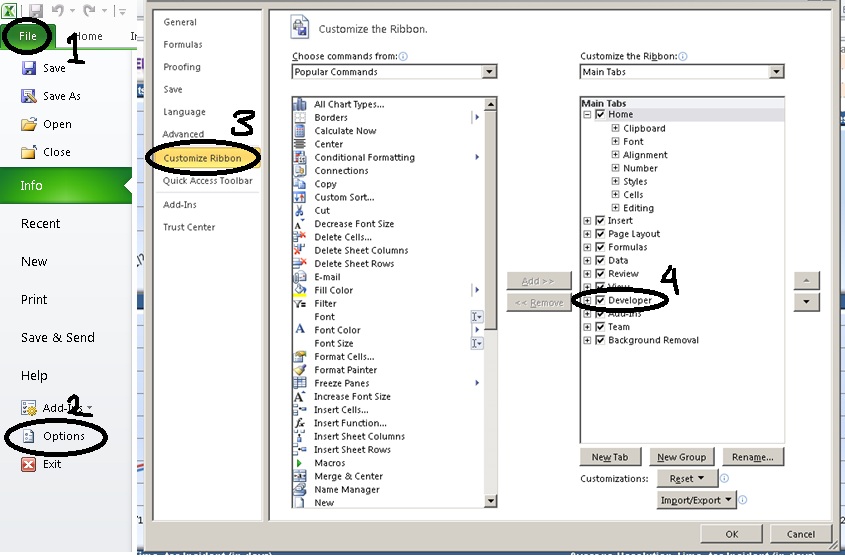


After enabling go to developer tab and then click on visual basic button. This will open visual basic editor.
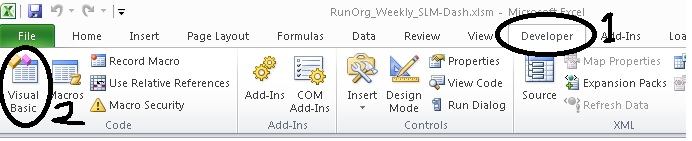


Paste the following code and save the excel file. Close the file and open again. You can see the alert message as soon as the file opens-
Sub Auto_Open()
    MsgBox "The file is open now"
End Sub
Download the sample excel 2010 file here.

Tuesday, October 30, 2012

Export HTML to excel using jQuery and asp.net

Here we will see how to export a HTML table content to excel using asp.net web form and C# using jQuery.

Let’s start with a small piece of code –
    <h2>
        Export to excel using jquery
    </h2>

    <a href="#" class="expToExcel">Export to excel</a>
    <div id="toReport">
    <table>
        <tr>
          <th>Name</th>
          <th>Age</th>
          <th>Email</th>
        </tr>
        <tr>
          <td>John</td>
          <td>44</td>
          <td>john@gmail.com</td>
        </tr>
        <tr>
          <td>Rambo</td>
          <td>33</td>
          <td>rambo@gmail.com</td>
        </tr>
        <tr>
          <td>It's hot</td>
          <td>33</td>
          <td>test@hotmail.com</td>
        </tr>
    </table>
    </div>
On click of "Export to excel" let do export the content to excel file using jQuery. We can do this in following steps-
  1. Get the HTML content.
  2. Encode the HTML content.
  3. Pass the HTML encoded content to an aspx page.
  4. Generate the excel file from code behind.
Step 1-
var data = $("#toReport").html();
data = escape(data);
Why we are escaping the HTML data and then passing to code behind. Answer is that we are going to pass the data to an aspx page using a dynamically created form. It is going to through "A potentially dangerous Request.Form value was detected from the client" error. That’s why we are escaping the HTML content.

Step 2-
$('body').prepend("<form method='post' action='exportPage.aspx' style='top:-3333333333px;' id='tempForm'><input type='hidden' name='data' value='" + data + "' ></form>");
$('#tempForm').submit();
$("tempForm").remove();
In this step we are adding an aspx page named exportPage.aspx. And creating a form tag on the fly, add the HTML data to a hidden field and submit the form using jQuery. And finally remove the added form tag.

Step 3 & 4-
        string data = Request.Form["data"];
        data = HttpUtility.UrlDecode(data);
        Response.Clear();
        Response.AddHeader("content-disposition", "attachment;filename=report.xls");
        Response.Charset = "";
        Response.ContentType = "application/excel";
        HttpContext.Current.Response.Write( data );
        HttpContext.Current.Response.Flush();
        HttpContext.Current.Response.End();
In this step we are simply creating the excel file and flushing the result as excel. You may see a message saying corrupt excel file do you want to open the file. You can open the file not an issue. I am too lazy to fine out proper setting.

You can also download the code from here.