Friday, July 10, 2020

Purse dynamic JSON with C#

First, let me explain what is we are trying to do in this post. Recently have a problem needed to parse a JSON to a C# object. Few of the fields are fixed whereas few are dynamic in nature. Like in the following JSON-
 
{
  "text": "TestallDay",
  "description": null,
  "recurrenceRule": null,
  "id": 238,
  "recurrenceException": null,
  "allDay": true,
  "startDate": "2020-07-07T05:00:00Z",
  "endDate": "2020-07-08T05:00:00Z",
  "resourceTypeId_52": [
    134
  ],
  "resourceTypeId_49": [
    118,
    124
  ]
}
There can be multiple such properties with resourceTypeId_* where * is a number and these properties contain an array of integers. Here is how we can solve this in one possible way. Declared a class like below-
 
    public class DataModel
    {
        [JsonProperty("text")]
        public string Text { get; set; }

        [JsonProperty("description")]
        public object Description { get; set; }

        [JsonProperty("recurrenceRule")]
        public object RecurrenceRule { get; set; }
        
        [JsonProperty("Id")]
        public int Id { get; set; }
        
        [JsonProperty("recurrenceException")]
        public object RecurrenceException { get; set; }
        
        [JsonProperty("allDay")]
        public bool AllDay { get; set; }
        
        [JsonProperty("startDate")]
        public DateTime StartDate { get; set; }
        
        [JsonProperty("endDate")]
        public DateTime EndDate { get; set; }
       
        [JsonProperty("ResourceTypeIds")]
        public Dictionary<string, int[]> ResourceTypeIds { get; set; }
    }
Here in the class you can see we have a property of type Dictionary where we need to fill in all such properties. We can use normal JSON conversion (in my case used JsonConvert from Newtonsoft) for other properties and we can use Newtonsoft.Json.Linq.JProperty to loop through all such properties - resourceTypeId_34, resourceTypeId_45 etc and fill in the values in integer dictionary. Here is the code-
 
            string json = "{\"text\":\"TestallDay\",\"description\":null,\"recurrenceRule\":null,\"id\":238,\"recurrenceException\":null,\"allDay\":true,\"startDate\":\"2020-07-07T05:00:00Z\",\"endDate\":\"2020-07-08T05:00:00Z\",\"resourceTypeId_52\":[134],\"resourceTypeId_49\":[118,124]}";
            
            var data = JsonConvert.DeserializeObject<DataModel>(json);
            data.ResourceTypeIds = new Dictionary<string, int[]>();
            JObject item = JObject.Parse(json);

            IEnumerable<JProperty> props = item.Properties().Where(p => p.Name.Contains("resourceTypeId"));
            foreach (var prop in props)
            {
                List<int> arrayItems = new List<int>();
                foreach (var arrItem in prop.Value)
                {
                    arrayItems.Add((int)arrItem);
                }
                data.ResourceTypeIds.Add(prop.Name, arrayItems.ToArray());
            }

The output looks like this screenshot-

 
IEnumerable<JProperty> props = item.Properties().Where(p => p.Name.Contains("resourceTypeId"));
            foreach (var (prop, arrayItems) in from prop in props
                                               let arrayItems = (from arrItem in prop.Value
                                                                 select (int)arrItem).ToList()
                                               select (prop, arrayItems))
            {
                data.ResourceTypeIds.Add(prop.Name, arrayItems.ToArray());
            }
Complete source code can be found here

Saturday, July 4, 2020

jqGrid load data from ASP.NET MVC Core controller

In this post, let's see how to bind jqGrid with data from asp.net core MVC with server-side paging. We are using User details as MVC view model. Here is the ViewModel-

    public class UserViewModel
    {
        public string UserId { get; set; }
        public string UserName { get; set; }
        public string Email { get; set; }
        public string Phone { get; set; }
    }

    public class UserPagingViewModel
    {
        public List<UserViewModel> Users { get; set; }
        public int CurrentPage { get; set; }
        public int ItemCount { get; set; }
        public int TotalPages { get; set; }
    }

Here UserPagingViewModel is used for pagination details for the grid.

Following is the controller and action method-

    public class _2168660_How_to_load_jQgrid_with_Json_data_coming_from_database_in_ASP_NET_COREController : Controller
    {
        public IActionResult Index()
        {
            return View();
        }
        [HttpPost]
        public UserPagingViewModel GetUsers(int page, int rows, string sidx, string sort)
        {
         //todo: use sidx and sort is not used, also read data from database 
            UserPagingViewModel model = new UserPagingViewModel();
            model.ItemCount = 500;
            model.CurrentPage = page;
            model.TotalPages = model.ItemCount / rows;

            var users = new List<UserViewModel<();
            for (int i = 0; i < rows; i++)
            {
                users.Add(GetRandomData.GetRandomDataObject<UserViewModel>());
            }
            model.Users = users;
            return model;
        }
    }

Here, GetRandomDataObject is not included in the source code, what it does is simply creates some rendom data list.

Below is the view part. jQuery reference is missing which you need to include. In my case it is included in the layout page. Here jsonReader is used to convert response to jqGrid desired.

<link crossorigin="anonymous" href="https://cdnjs.cloudflare.com/ajax/libs/jqueryui/1.12.1/jquery-ui.min.css" integrity="sha512-aOG0c6nPNzGk+5zjwyJaoRUgCdOrfSDhmMID2u4+OIslr0GjpLKo7Xm0Ao3xmpM4T8AmIouRkqwj1nrdVsLKEQ==" rel="stylesheet"></link>
<link crossorigin="anonymous" href="https://cdnjs.cloudflare.com/ajax/libs/free-jqgrid/4.15.5/css/ui.jqgrid.min.css" integrity="sha512-xAIWSSbGucVRdutqUD0VLDowcMF/K8W87EbIoa9YUYB4bTyt/zeykyuu9Sjp0TPVdgrgGgBVCBowKv46wY5gDQ==" rel="stylesheet"></link>
<link crossorigin="anonymous" href="https://cdnjs.cloudflare.com/ajax/libs/free-jqgrid/4.15.5/plugins/css/ui.multiselect.min.css" integrity="sha512-UuhJihFIXhnP4QEzaNXfLmzY9W3xoeTDATm0buV4wb2qJKoikNn568f0zA5QmrX0sp6VZzqE6fffvsTYU34tGA==" rel="stylesheet"></link>

<script crossorigin="anonymous" integrity="sha512-uto9mlQzrs59VwILcLiRYeLKPPbS/bT71da/OEBYEwcdNUk8jYIy+D176RYoop1Da+f9mvkYrmj5MCLZWEtQuA==" src="https://cdnjs.cloudflare.com/ajax/libs/jqueryui/1.12.1/jquery-ui.min.js"></script>
<script crossorigin="anonymous" integrity="sha512-xt9pysburfYgFvYEtlhPDo8qBEPsupsDvWB8+iwspD+oQTvAdDEpA1aIKcH6zuABU528YitH6jtP0cAe5GrwKA==" src="https://cdnjs.cloudflare.com/ajax/libs/free-jqgrid/4.15.5/jquery.jqgrid.min.js"></script>

<table id="dataTable"></table>
<div id="pager"></div>

<script>
    jQuery("#dataTable").jqGrid({
   	url:'@Url.Action("GetUsers", "_2168660_How_to_load_jQgrid_with_Json_data_coming_from_database_in_ASP_NET_CORE")',
	datatype: "json",
    mtype: 'POST',
   	colNames:['User id','User name', 'Email', 'Phone'],
   	colModel:[
   		{name:'userId',index:'userId', width:100},
   		{name:'userName',index:'userName', width:200},
   		{name:'email',index:'email', width:80, align:"right"},
   		{name:'phone',index:'phone', width:80, align:"right"}		
   	],
   	rowList:[10,20,30],
   	pager: '#pager',
    width: '700',
    rowNum:10,
   	sortname: 'userId',
    viewrecords: true,
    sortorder: "desc",
    jsonReader: {
        repeatitems: false,
        root: function(obj) { return obj.users; },
        page: function(obj) { return obj.currentPage; },
        total: function(obj) { return obj.totalPages; },
        records: function(obj) { return obj.itemCount; },
        id: "userId"
    },
    caption:"JSON Example"
});
jQuery("#list2").jqGrid('navGrid','#pager',{edit:false,add:false,del:false});
</script>

You can clone the working copy from Github

Thursday, September 27, 2018

Fortify scan with sourceanalyzer using Jenkins - Unable to load build session with ID "sample_id"

Are you running fortify scan through sourceanalyzer for MSBuild? Are you running it with Jenkins? Jenkins node is running with Windows? May be following a process describe here.

Following steps working fine if you are running with powershell or cmd, but not working when you run with Jenkins? Scan is failing on scan step?
sourceanalyzer -b fortify_sample -clean
sourceanalyzer -b fortify_sample msbuild Fortify.Samples.sln /t:ReBuild
sourceanalyzer -b fortify_sample -scan -f result.fpr
Saying-

[error]: Unable to load build session with ID " fortify_sample". See log file for more details.

Provable solution:
Please check the output of the MSBuild step. There will be some .txt file generated for the build step. Please check the location of the files generated. If the files are not generated, that means there are some permission issue of the user under which Jenkins service or agent service is running.

In my case the issue was my Jenkins service was running under local system and it was trying to write to C:\Windows\system32\config\systemprofile\AppData.

I changed service running user id to a service account and started working fine.

How to run fortify scan for dotnet solution using MSBuild

It's simply a 4 stage process.

Step 1: Clear previous scan build
sourceanalyzer -b build_id  -clean
Here build id is an unique string that represent identification of a particular scan in the system (in our case the system is fortify-jenkins-node) where it is run. Ideally this is unique to a solution file e.g.
sourceanalyzer -b appointment_api -clean
Step 2: Analize solution
sourceanalyzer -b build_id msbuild mysolution.sln /t:ReBuild
e.g.
sourceanalyzer -b fortify_sample msbuild Fortify.Samples.sln /t:ReBuild
Step 3: Generate report
sourceanalyzer -b build_id -scan -f result.fpr
e.g.
sourceanalyzer -b fortify_sample -scan -f result.fpr
This will run the scan in local system. We can run scan in fortify server, we need to use a different command in that case, which is cloudscan.

Step 4: Upload report
This step upload report (*.fpr) file to fortify server. This step is needed if we are running local scan. If we are running cloud scan then its not needed.
fortifyclient -url http://fortify.nextgen.com/ssc -authtoken "xxxxxx-xxxxxxxxx-xxxxxxxx-xxxx-xxxxxx" uploadFPR -file result.fpr -project "Application_name" -version 9.9
Here
  • URL is URL for fortify server, the system from where this command is run, should have access to fortify server
  • authtoken is a token type "uploadFPR" which we can get it generated from fortify server. If we dont have one, can contact to AppSec for the same
  • Application_name is name of the application that is created in fortify server for current application. Ideally one solution will have one application in fortify server
  • Version is version number of the application in fortify server.
e.g.

fortifyclient -url http://fortify.myserver.com/ssc -authtoken "038bff7e-7e8c-4007-9aXX-748XXXX1a" uploadFPR -file result.fpr -project "fortify_sample" -version 1.0

Tuesday, August 7, 2018

Microsoft.WebApplication.targets not found with MSBuild for Build Tools for Visual Studio 2017

Was working with Jenkins integration and was using MSBuild for Build Tools for Visual Studio 2017(which by default gets installed into C:\Program Files (x86)\Microsoft Visual Studio\2017\BuildTools\MSBuild\15.0). While building a web application developed with framework 4.7.1 (in my case). Class library was getting build successfully but was getting following error for web application.
error MSB4226: The imported project "C:\Program Files (x86)\Microsoft Visual Studio\2017\BuildTools\MSBuild\Microsoft\VisualStudio\v15.0\WebApplications\Microsoft.WebApplication.targets" was not found. Also, tried to find "WebApplications\Microsoft.WebApplication.targets" in the fallback search path(s) for $(VSToolsPath) - "C:\Program Files (x86)\MSBuild\Microsoft\VisualStudio\v15.0" . These search paths are defined in "C:\Program Files (x86)\Microsoft Visual Studio\2017\BuildTools\MSBuild\15.0\Bin\MSBuild.exe.Config". Confirm that the path in the declaration is correct, and that the file exists on disk in one of the search paths.
Resolution-

In my case I have downloaded Build Tools for Visual Studio 2017 from https://visualstudio.microsoft.com/downloads/#build-tools-for-visual-studio-2017(search inside All downloads). Downloaded exe will have name like vs_buildtools__1674480101.1516182736.exe.
But while installing build tool I have not selected the following option(Web development build tools)-


Steps:
  • Download build tools from above and rename it to vs_buildtools.exe
  • Open command prompt and CD to the same folder where vs_buildtools.exe is
  • Run the following command- vs_buildtools.exe --add Microsoft.VisualStudio.Workload.WebBuildTools
This command will mark Web development build tools preselected in the installation window. Complete the installation and you should get the issue resolved.

Monday, November 21, 2016

Rethinkdb replace multiple fields with object and array as nested field type

I came across a requirement where I need to replace multiple fields in a document. In my case the document has two fields, one as object and other as array. What was needed is modify the nested array and object in the same query.

Let’s take an example document for this case-
{
 "badgeCount" : {
  "09cf79ad-cce7-4826-8a66-e0653eabae4e" : 0,
  "5cdf9a50-b4e3-4240-8ddc-979b25820745" : 1
 },
 "createdDate" : new Date(),
 "deleted" : false,
 "roomName" : "my room",
 "description" : "my room description",
 "id" : "c58f3c08-4d84-41c7-b705-88cd081dfa04",
 "joinedUserIds" : [
  "09cf79ad-cce7-4826-8a66-e0653eabae4e",
  "5cdf9a50-b4e3-4240-8ddc-979b25820745"
 ]
}
This document is about a room, where a user can join a room via joinedUserIds and they have badgeCount which says how many new messages are there in the room. Each item in the array joinedUserIds is a use id and there is a property of the same user id in the badgeCount object.

So, in my case what was needed, when a user leaves a room we need to remove the user id from joinedUserIds and also from badgeCount.

Solution goes like this-
r.db('test').table('room').get("c58f3c08-4d84-41c7-b705-88cd081dfa04").replace(function (s) {
 return s.without({
  badgeCount : {
   "09cf79ad-cce7-4826-8a66-e0653eabae4e" : true
  }
 }).without("joinedUserIds").merge({
  joinedUserIds : s("joinedUserIds").filter(function (id) {
   return id.ne("09cf79ad-cce7-4826-8a66-e0653eabae4e");
  })
 })
})
We have solved this by replace with chained without. First without is removing 09cf79ad-cce7-4826-8a66-e0653eabae4e from badgCount. Result of first without is, it will remove 09cf79ad-cce7-4826-8a66-e0653eabae4e from badgeCount object. Second without removes joinedUserIds and then adds it back with merge and filter.

Tuesday, April 26, 2016

SQL like IN clause in RethinkDB

Let’s consider a simple example of product. We need to get all product where product ids in a given list. A product document goes like this-
[
      {
         “ID”:0,
         “Name”:”Bread”,
         “Description”:”Whole grain bread”,
         “ReleaseDate”:”1992-01-01T00:00:00″,
         “DiscontinuedDate”:null,
         “Rating”:4,
         “Price”:”2.5″
      },
      {
         “ID”:1,
         “Name”:”Milk”,
         “Description”:”Low fat milk”,
         “ReleaseDate”:”1995-10-01T00:00:00″,
         “DiscontinuedDate”:null,
         “Rating”:3,
         “Price”:”3.5″
      },
      {
         “ID”:2,
         “Name”:”Vint soda”,
         “Description”:”Americana Variety – Mix of 6 flavors”,
         “ReleaseDate”:”2000-10-01T00:00:00″,
         “DiscontinuedDate”:null,
         “Rating”:3,
         “Price”:”20.9″
      },
   …
   ]
An equivalent SQL statement in this case will be –
SELECT ID, Name, Description from Products WHERE ID IN (1,2)
To implement this we can use filter with expr and map like below-
r.table('products').filter(function(product) {
        return r.expr([1,2]).contains(product('ID'))
    }).map(function (product) {
        return {
            id : product('ID'),
            name : product('Name'),
            description: product('Description')
        }
    });


Tuesday, February 17, 2015

Creating a mongo DB replica set in windows desktop

I was going through mongo DB online course “M101JS: MONGODB FOR NODE.JS DEVELOPERS” and got stuck on the assignment “HOMEWORK: HOMEWORK 6.5”. As I was working on windows and the steps given was for MAC or Linux environment. I thought of sharing this with others. The original steps are as follows-

In this homework you will build a small replica set on your own computer. We will check that it works with validate.js, which you should download from the Download Handout link. Create three directories for the three mongod processes.

On unix or mac, this could be done as follows:
mkdir -p /data/rs1 /data/rs2 /data/rs3
Now start three mongo instances as follows. Note that are three commands. The browser is probably wrapping them visually.
mongod --replSet m101 --logpath "1.log" --dbpath /data/rs1 --port 27017 --smallfiles --oplogSize 64 --fork 
mongod --replSet m101 --logpath "2.log" --dbpath /data/rs2 --port 27018 --smallfiles --oplogSize 64 --fork
mongod --replSet m101 --logpath "3.log" --dbpath /data/rs3 --port 27019 --smallfiles --oplogSize 64 –fork
Windows users: Omit -p from mkdir. Also omit --fork and use start mongod with Windows compatible paths (i.e. back slashes "\") for the --dbpath argument (e.g; C:\data\rs1).

Now connect to a mongo shell and make sure it comes up
mongo --port 27017
Now you will create the replica set. Type the following commands into the mongo shell:
config = { _id: "m101", members:[
          { _id : 0, host : "localhost:27017"},
          { _id : 1, host : "localhost:27018"},
          { _id : 2, host : "localhost:27019"} ]
         };
rs.initiate(config);
At this point, the replica set should be coming up. You can type
rs.status()
to see the state of replication.

The steps I have followed as below-

I kept all the database file in the following folder - D:/Anup/POCs/MongoDB/data/test_replicaset. So the create directory looks like below-
mkdir "D:/Anup/POCs/MongoDB/data/test_replicaset/rs1" "D:/Anup/POCs/MongoDB/data/test_replicaset/rs2" "D:/Anup/POCs/MongoDB/data/test_replicaset/rs3"


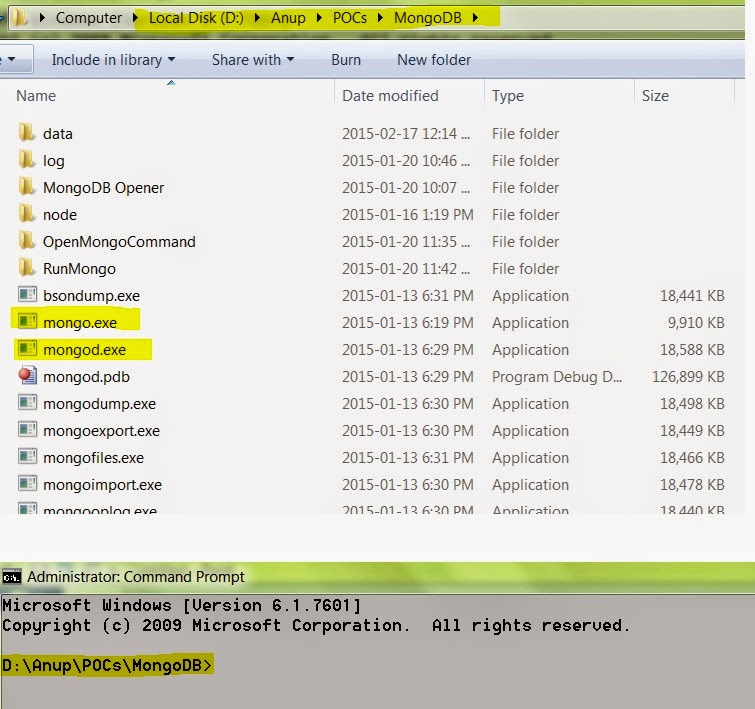
Now before moving further please make sure that in command prompt you are already in the mongo DB bin folder. In my case the mongo.exe and mongod.exe are in the folder -D:\Anup\POCs\MongoDB.


Now as per the given instruction the mnogo DB command for create replica set for windows looks like below-
mongod --replSet m101 --logpath "D:/Anup/POCs/MongoDB/data/test_replicaset/1.log" --dbpath D:/Anup/POCs/MongoDB/data/test_replicaset/rs1 --port 27017 --smallfiles --oplogSize 64 start mongod  
mongod --replSet m101 --logpath "D:/Anup/POCs/MongoDB/data/test_replicaset/2.log" --dbpath D:/Anup/POCs/MongoDB/data/test_replicaset/rs2 --port 27018 --smallfiles --oplogSize 64 start mongod 
mongod --replSet m101 --logpath "D:/Anup/POCs/MongoDB/data/test_replicaset/3.log" --dbpath D:/Anup/POCs/MongoDB/data/test_replicaset/rs3 --port 27019 --smallfiles --oplogSize 64 start mongod
But for some reason I was unable to execute the script in one go. So what I have done is opened three command prompts and executed the command separately like below ( removing start mongod at the end).


Next I have opened another command prompt to run mongo command-
mongo --port 27017
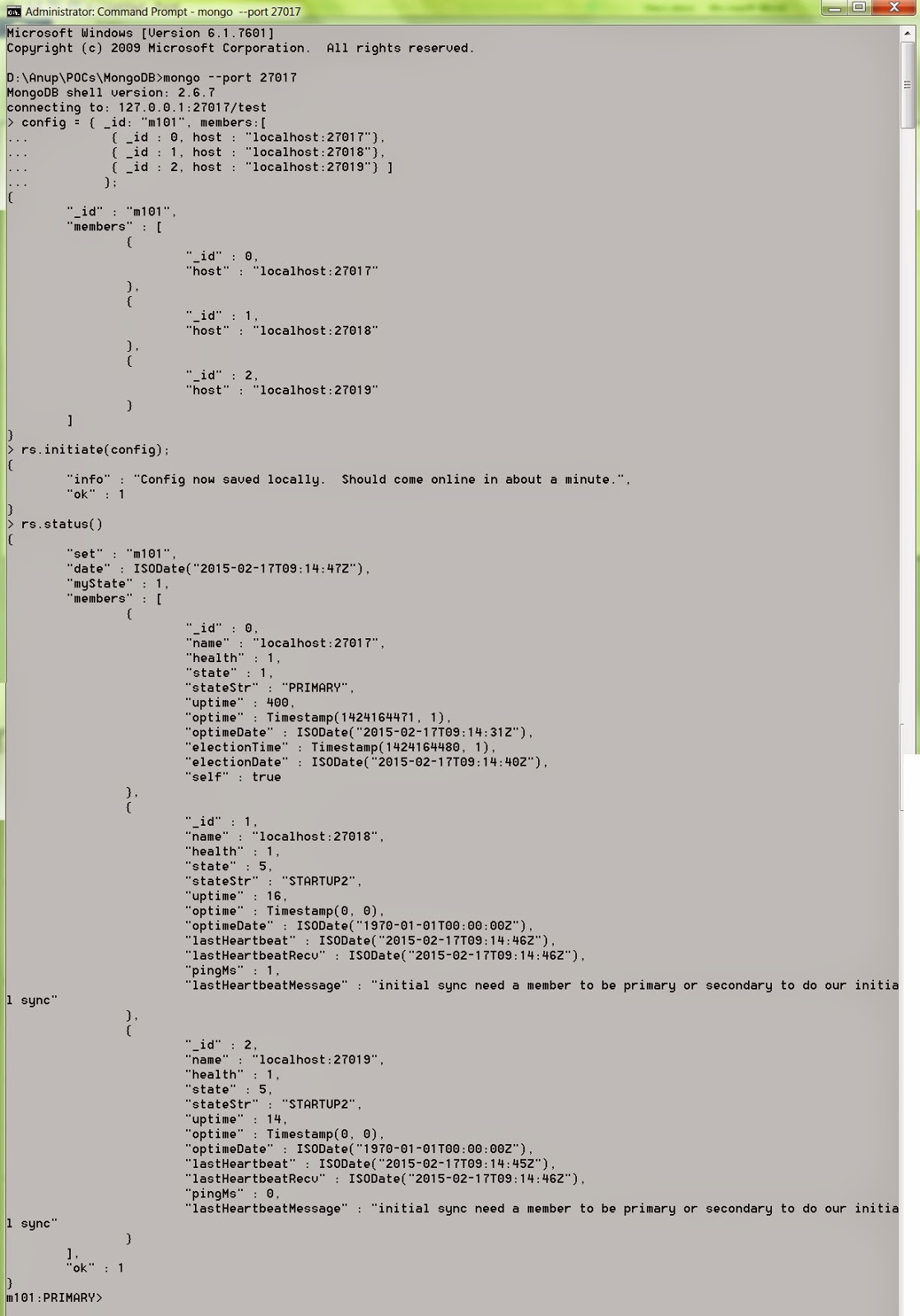
Once the mongo shell connected to test database, executed the remaining of the config command and checked the status. It’s started running.


Wednesday, December 24, 2014

Consuming Microsoft web API from Angular JS application – Cross domain – Cross site: JSONP

In this post we are going to explore how to consume web API from angular JS application. This is a cross domain call where the web API will reside in a different application than the angular call. We will do this with JSONP.

In this example we will be using visual studio 2013, web API 2 and angular JS 1.3.8

Here I am using the Product web API sample from asp.net site. You can find the steps here. Follow the steps for creating the web API project.

Now if we check the URL(api/products), we will get listing of all products in the browser in xml format. In this example we will use JSON data as result, we can change this by changing formatter. We can add the following code to change the formatter in WebApiConfig at the end of Register(HttpConfiguration config) method.
config.Formatters.Clear();
config.Formatters.Add(new JsonMediaTypeFormatter());
Check the difference after changing the formatter.


Now we are ready for consuming it from angular JS.

We can add the angular JS reference using NuGet like below-


If you have issue with NuGet, you can download the latest version of angular JS from the angular site and refer it to the page.

Now let’s define a module(ProductModule) and a controller(ProductCtrl) for reading the products from the web API method.
var product = angular.module("ProductModule", []);
product.controller("ProductCtrl", ["$scope", "$http", function ($scope, $http) {
//to do    
}]);
Here we have added $http as we need to consume a service. We can do the call to API service with a callback and jsonp as calling method. We are using jsonp here are the angular site and the api are two different web site and hence cross domain.
var product = angular.module("ProductModule", []);

product.controller("ProductCtrl", ["$scope", "$http", function ($scope, $http) {
    $http({
        method: 'jsonp',
        url: 'http://localhost:51116/api/products?callback=JSON_CALLBACK'
    })
        .success(function (data, status, headers, config) {
            $scope.Products = data;
            
        })
        .error(function (data, status, headers, config) {
            
        });
}]);
As we are using jsonp, we need to append a callback to the calling URI, hence ?callback=JSON_CALLBACK'. Angular JS internally handles and returns the result with the data parameter in the success method.

Now let’s design a HTML page for consuming the result from the service. HTML goes like this-
<html xmlns="http://www.w3.org/1999/xhtml">
<head>
    <title></title>
</head>
<body ng-app="ProductModule">
    <table ng-controller="ProductCtrl">
        <thead>
            <tr>
                <th>Id</th>
                <th>Name</th>
                <th>Category</th>
                <th>Price</th>
            </tr>
        </thead>
        <tbody>
            <tr ng-repeat="product in Products">
                <td>{{product.Id}}</td>
                <td>{{product.Name}}</td>
                <td>{{product.Category}}</td>
                <td>{{product.Price}}</td>
            </tr>
        </tbody>
    </table>
    <script src="Scripts/angular.js"></script>
    <script src="Domain JS/ProductCtrl.js"></script>
</body>
</html>
Now before running the application please check the URL specially the port number. If this is correct, you should be getting some 404 error. Let’s check this in chrome developer tool. Screenshots are there in the image below. The Ajax request is 200 OK and there is proper data in the response tab-


Then what is the Issue. If you check the request URL, it is http://localhost:51116/api/products?callback=angular.callbacks._0 But we have provided the URL as http://localhost:51116/api/products?callback=JSON_CALLBACK. This is not an issue. Angular JS is internally changing JSON_CALLBACK to angular.callback._0. Now let’s check the response. It’s coming as-
[{"Id":1,"Name":"Tomato Soup","Category":"Groceries","Price":1.0},{"Id":2,"Name":"Yo-yo","Category":"Toys","Price":3.75},{"Id":3,"Name":"Hammer","Category":"Hardware","Price":16.99}]
Here is the problem. As it is a JSONP request the response should be like angular.callback._0(response) that is –
angular.callback._0( [{"Id":1,"Name":"Tomato Soup","Category":"Groceries","Price":1.0},{"Id":2,"Name":"Yo-yo","Category":"Toys","Price":3.75},{"Id":3,"Name":"Hammer","Category":"Hardware","Price":16.99}])
That is what Web API should be doing and the JSON formatter should support this. The formatter that we have used (JsonMediaTypeFormatter) is not having this feature. There is a nice work around for this. We can add JsonpFormatter for this. Please check the below link for detail-

https://github.com/WebApiContrib/WebApiContrib.Formatting.Jsonp

Let’s install JsonpFormatter formatter using NuGet. Search for WebApiContrib.Formatting.Jsonp in NuGet manager and install like below-


Next we need to add the callback capability and expose json data like below-
GlobalConfiguration.Configuration.AddJsonpFormatter();
GlobalConfiguration.Configuration.Formatters.XmlFormatter.SupportedMediaTypes.Clear();
Now the results is coming in correct format and successful. The complete source code is attached here.

Monday, August 4, 2014

Accessing derived class properties in the base class public method and creating dynamic queries

There are many ORM models that work on Object Relation Mapping. It generates queries on the fly based on the XML config file and reflection.

This post is intended to explain a simple scenario of how we can write a method like on a base class say ”save”, and any class that is derived from this base class should automatically call the save method, create a dynamic query and save the data on database.

Now let’s take a simple class named Person that has only two fields as below-
public class Person {
    public string FirstName { get; set; }
    public string LastName { get; set; }
}
And on doing the following code it should take the value from the instance “p”, create a dynamic query and save the data to database-
Person p = new Person() { FirstName="John", LastName="Smit" };
        p.save();
We can follow few steps for doing that.

Step 1 : Let’s create an class label attribute that will carry the name of the table for saving data in the database. It goes like this-
[System.AttributeUsage(System.AttributeTargets.Class )]
public class TableName : System.Attribute
{
    public string name;
    public TableName() 
    {
    }
    public TableName(string name)
    {
        this.name = name;
    }
}
Step 2 : is to create a base class that will implement a public method “save”. Ideally we should make this class as generic class as we need to access the property and the value of the properties. So, we can have this class as –
public class DBObjectwhere T:class { 
    public void save(){

        //implementation goes here
            
    }
}
So the inheritance will be below. Here we have added TableName attribute and tblPerson is the database table name-
[TableName(name="tblPerson")]
public class Person : DBObject {
    public string FirstName { get; set; }
    public string LastName { get; set; }
}
Step 3 : What we need to do in this step is five things.
  1. Get the name of the table
  2. Create comma separated table field name
  3. Create comma separated table field value to insert
  4. Create the query
  5. Do database call 

Step 3-1: We are passing type information to DBObject so we can get custom attribute(TableName) value through T like below-
 (typeof(T).GetCustomAttributes(false).FirstOrDefault() as TableName).Name
Step 3-2: We can get comma separated field names from T using reflection like below-
string.Join(",", (from p in typeof(T).GetProperties().AsEnumerable()
                                   select p.Name).ToArray());
Step 3-3: We can get comma separated field values from T using reflection like below-
string.Join(",", (from p in typeof(T).GetProperties().AsEnumerable()
                                   select "'"+ p.GetValue(this,null)+"'").ToArray());
Step 3-4: We can create final query as following-
string.Format("insert into {0} ({1}) values ({2})  ", attr.name, fields, values);
So the complete save method will look like below-
    public void save(){
        var attr = typeof(T).GetCustomAttributes(false).FirstOrDefault() as TableName;
        string fields, values;
        fields = string.Join(",", (from p in typeof(T).GetProperties().AsEnumerable()
                                   select p.Name).ToArray());
        values = string.Join(",", (from p in typeof(T).GetProperties().AsEnumerable()
                                   select "'"+ p.GetValue(this,null)+"'").ToArray());
        string query = string.Format("insert into {0} ({1}) values ({2})  ", attr.name, fields, values);
    }
Step 3-5: Variable query will finally result the following string for this example-
insert into tblPerson (FirstName,LastName) values ('John','Smit')  
This is the query we are looking for. I am not completing the data base call part.

How to upload multiple records in C# and stored procedure without looping

Recently I come across a question regarding how to save multiple records in sql server using C# and without using any loop.

Let’s take a simple case of saving list of persons. Let’s have the following class as person-

public class Person {
        public string PFirstName { get; set; }
        public string PLastName { get; set; }
        public int PAge { get; set; }
    }
Then let’s create a simple data base table called Person as below-
CREATE TABLE [dbo].[Person](
	[FirstName] [varchar](100) NULL,
	[LastName] [varchar](100) NULL,
	[Age] [int] NULL
) ON [PRIMARY] 
Now we can solve this problem by passing XML data as input to a stored procedure and using SQL XML for parsing data and saving to database.

So, let’s first create a list of persons for this example like below-
 List personList =new List(){
                new Person(){ PFirstName="abc", PLastName= "smit", PAge=32},
                new Person(){ PFirstName="bcd", PLastName= "pal", PAge=32}
            };
 
Now let’s parse this list to XML for saving and put it into a string variable-
 string SProc = "dbo.save_person_bulk";
            string ConnectonString = @"Data Source=(local);Initial Catalog=sample;Integrated Security=True;";
            using (SqlConnection sqlConnection = new SqlConnection(ConnectonString))
            {
                sqlConnection.Open();

                using (SqlCommand sqlCommand = new SqlCommand(SProc, sqlConnection))
                {
                    sqlCommand.CommandType = CommandType.StoredProcedure;
                    sqlCommand.Parameters.Add(new SqlParameter("@person_data", SqlDbType.VarChar)
                          {
                              Value = xmlPersonData
                          });
                    using (DataTable dataTable = new DataTable())
                    {
                        using (SqlDataAdapter sqlDataAdapter = new SqlDataAdapter())
                        {
                            sqlDataAdapter.SelectCommand = sqlCommand;
                            sqlDataAdapter.Fill(dataTable);
                        }
                    }
                }
            }
On doing the list parsing the resulting XML will look like this- Looking at the generated XML and the stored procedure the code is self explanatory.

Tuesday, May 14, 2013

Enterprise Library 6.0: The LogWriter has not been set for the Logger static class. Set it invoking the Logger.SetLogWriter method

A common approach to create a log entry using the following code-
LogEntry entry = new LogEntry();
entry.Message = "I am logging";
Logger.Write(entry);
This works fine with Enterprise Library 5.0. But in 6.0 it gives the error in the title. We can solve this by the following-
Logger.SetLogWriter(new LogWriterFactory().Create());
LogEntry entry = new LogEntry();
entry.Message = "I am logging";
Logger.Write(entry);
Or we can also try-
IConfigurationSource configurationSource = ConfigurationSourceFactory.Create();
LogWriterFactory logWriterFactory = new LogWriterFactory(configurationSource);
Logger.SetLogWriter(logWriterFactory.Create());
LogEntry entry = new LogEntry();
entry.Message = "I am logging";
Logger.Write(entry);

Tuesday, December 11, 2012

Run some VBA code when excel opens

This is a very simple post describes how to run some code when excel opens.

Excel always runs a subroutine named Auto_Open() when excel opens. Simple we can use this subroutine to do the job.

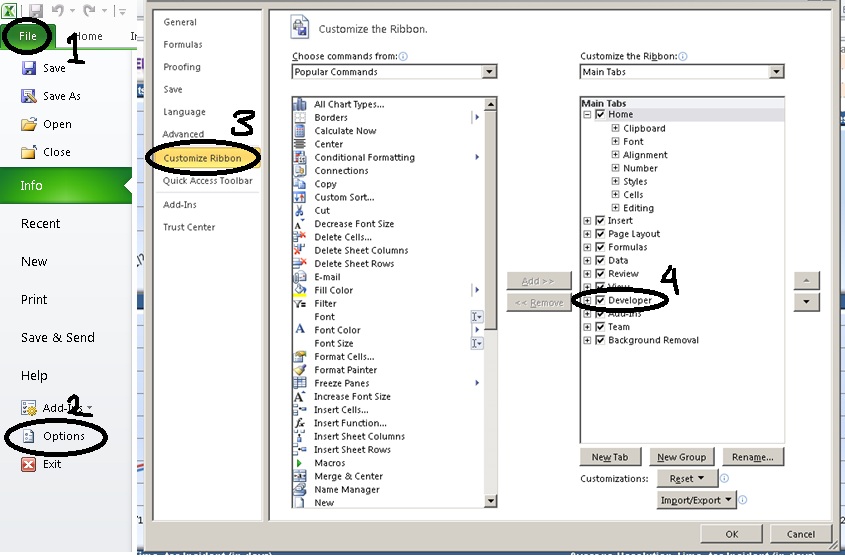
Go to developer tab then click visual basic button. If you cannot locate developer tool then you can enable developer tab by looking into the image below-


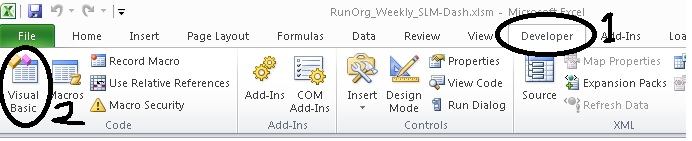
After enabling go to developer tab and then click on visual basic button. This will open visual basic editor.


Paste the following code and save the excel file. Close the file and open again. You can see the alert message as soon as the file opens-
Sub Auto_Open()
    MsgBox "The file is open now"
End Sub
Download the sample excel 2010 file here.

Monday, November 26, 2012

Asp.net validation add text background color

Following is code for adding background color to the text box if validation fails in asp.net web form-

<html xmlns="http://www.w3.org/1999/xhtml">
<head runat="server">
    <title></title>
</head>
<body>
    <form id="form1" runat="server">
    <asp:TextBox ID="txtOne" runat="server" />
      <asp:RequiredFieldValidator ID="rfv" runat="server" 
                                 ControlToValidate="txtOne" Text="" />
      <asp:TextBox ID="txtTwo" runat="server" />
      <asp:RequiredFieldValidator ID="rfv2" runat="server" 
                                 ControlToValidate="txtTwo" Text="" />
      <asp:Button ID="btnOne" runat="server" OnClientClick="return BtnClick();" 
                                         Text="Click" CausesValidation="true" />
   <script type="text/javascript">
       function BtnClick() {
            var val = Page_ClientValidate();
            if (!val) {
                var i = 0;
                for (; i < Page_Validators.length; i++) {
                    if (!Page_Validators[i].isvalid) {
                        $("#" + Page_Validators[i].controltovalidate)
                         .css("background-color", "red");
                    }
                }
            }
            return val;
        }
    </script>
    </form>
</body>
</html>


Wednesday, November 7, 2012

Export PDF using jQuery and generic handler in asp.net

Recently I have added a post regarding Export HTML to excel using jQuery and asp.net. Here I am repeating the same for PDF. I will suggest you to go through the previous post as I am not explaining repeating technical aspects.

Let’s directly check the following HTML code-
<html xmlns="http://www.w3.org/1999/xhtml">
<head runat="server">
<script src="http://ajax.aspnetcdn.com/ajax/jQuery/jquery-1.7.js" type="text/javascript"></script>
<script type="text/javascript">
    $(document).ready(function() { 
        $(".expPDF").click(function(){
            var someDummyParameter="test";
            $('body').prepend("<form method='post' action='GetPDF.ashx' style='top:-3333333333px;' id='tempForm'><input type='hidden' name='data' value='" + someDummyParameter + "' ></form>");
            $('#tempForm').submit();
            $("tempForm").remove();
        });
    });
</script>
</head>
<body>
    <form id="form1" runat="server">
    <a href="#" target="_blank" class="expPDF">Export to pdf</a>
    </form>
</body>
</html>
The above code is simple. We are having a simple anchor(a) as a button to lunch the PDF. On the click of the anchor we are creating a form tag on the fly, assigning the action to a generic handler that will create the PDF file. At the end we are submitting the form. On the form submit the form will get posted to generic handler. In this example we are also passing some dummy data as hidden filed which will be accessible in the handler code. Likewise we need some additional information we can pass form elements.

Now let’s define the handler code. In the handler we can create the PDF file using some library like itextsharp or something similar. But in this example we are just reading PDF file from the memory the memory. Code is like this-
<%@ WebHandler Language="C#" Class="GetPDF" %>

using System;
using System.Web;

public class GetPDF : IHttpHandler {
    
    public void ProcessRequest (HttpContext context) {
                
        string inputData = context.Request.Form["data"];
        
        byte[] buffer;
        using (System.IO.FileStream fileStream = new System.IO.FileStream(@"E:\ForumPosts\jQueryPDF\" + inputData + ".pdf", System.IO.FileMode.Open, System.IO.FileAccess.Read, System.IO.FileShare.Read))
        using (System.IO.BinaryReader reader = new System.IO.BinaryReader(fileStream))
        {
            buffer = reader.ReadBytes((int)reader.BaseStream.Length);
        }
        context.Response.ContentType = "application/pdf";
        context.Response.AddHeader("Content-Length", buffer.Length.ToString());
        context.Response.AppendHeader("content-disposition", "inline; filename=test.pdf"); 
        context.Response.BinaryWrite(buffer);
        context.Response.End(); 
    }
 
    public bool IsReusable {
        get {
            return false;
        }
    }

}
As you can see the first line in the handler ProcessRequest function we are accessing the form data passed string inputData = context.Request.Form["data"];. The remaining code is self-explanatory. The PDF file path I have hard coded according to my folder structure.

You can download the code form here.

Tuesday, October 30, 2012

Export HTML to excel using jQuery and asp.net

Here we will see how to export a HTML table content to excel using asp.net web form and C# using jQuery.

Let’s start with a small piece of code –
    <h2>
        Export to excel using jquery
    </h2>

    <a href="#" class="expToExcel">Export to excel</a>
    <div id="toReport">
    <table>
        <tr>
          <th>Name</th>
          <th>Age</th>
          <th>Email</th>
        </tr>
        <tr>
          <td>John</td>
          <td>44</td>
          <td>john@gmail.com</td>
        </tr>
        <tr>
          <td>Rambo</td>
          <td>33</td>
          <td>rambo@gmail.com</td>
        </tr>
        <tr>
          <td>It's hot</td>
          <td>33</td>
          <td>test@hotmail.com</td>
        </tr>
    </table>
    </div>
On click of "Export to excel" let do export the content to excel file using jQuery. We can do this in following steps-
  1. Get the HTML content.
  2. Encode the HTML content.
  3. Pass the HTML encoded content to an aspx page.
  4. Generate the excel file from code behind.
Step 1-
var data = $("#toReport").html();
data = escape(data);
Why we are escaping the HTML data and then passing to code behind. Answer is that we are going to pass the data to an aspx page using a dynamically created form. It is going to through "A potentially dangerous Request.Form value was detected from the client" error. That’s why we are escaping the HTML content.

Step 2-
$('body').prepend("<form method='post' action='exportPage.aspx' style='top:-3333333333px;' id='tempForm'><input type='hidden' name='data' value='" + data + "' ></form>");
$('#tempForm').submit();
$("tempForm").remove();
In this step we are adding an aspx page named exportPage.aspx. And creating a form tag on the fly, add the HTML data to a hidden field and submit the form using jQuery. And finally remove the added form tag.

Step 3 & 4-
        string data = Request.Form["data"];
        data = HttpUtility.UrlDecode(data);
        Response.Clear();
        Response.AddHeader("content-disposition", "attachment;filename=report.xls");
        Response.Charset = "";
        Response.ContentType = "application/excel";
        HttpContext.Current.Response.Write( data );
        HttpContext.Current.Response.Flush();
        HttpContext.Current.Response.End();
In this step we are simply creating the excel file and flushing the result as excel. You may see a message saying corrupt excel file do you want to open the file. You can open the file not an issue. I am too lazy to fine out proper setting.

You can also download the code from here.

Wednesday, October 3, 2012

Progress bar for long running process with steps using asp.net, C#, SignalR

I have come across with many questions regarding implementing progress of some long running operations in asp.net application. And I could not see any way to solve this problem directly in asp.net. Even with ajax call to get what step is running is not possible because once a long process has started, the server cannot listen to an ajax request until the previous step is finished. This is because the processing is done as a single thread.

Thanks to Microsoft for VS 2010 and SignalR.

Here we will try to implement a demo progress of long running application step by step using SignalR and visual studio 2010.

Step 1- Install signal R
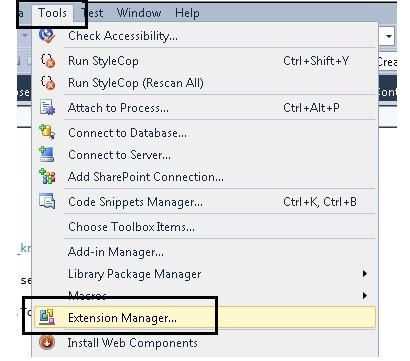
Check whether NuGet package manager is installed with your visual studio. If not go to tool -> Extension manager this will pop up the following window-


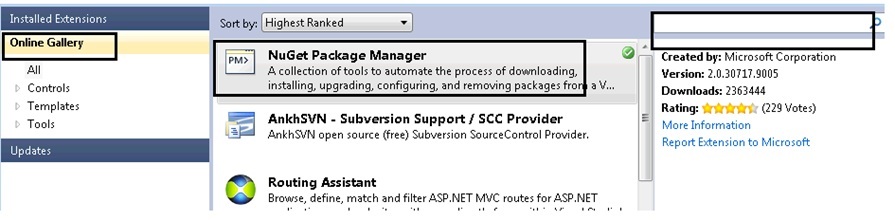
Go to online gallery, if you cannot see NuGet Package Manager, then search on the search box on the left side. Install it.

Create a web application with dot net framework 4, and then right click on the project and then click on Manage NuGet Packages… This will pop up the above window again like below-


Go to online then type signalr in the search box. This will list SignalR as the first item. Click on install.

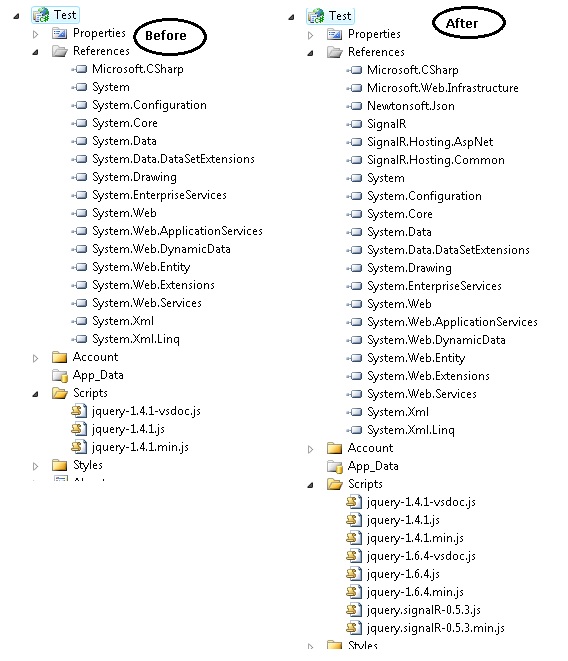
If you note down the reference of your project and the js file you can see the following difference-


Step 2-
First we will create a class named ServerComplexObjectand inherit this from SignalR.Hubs.Hub. And we will add a method named ComplexProcess() like below-
    public class ServerComplexObject:SignalR.Hubs.Hub {
        public void ComplexProcess()
        {
            System.Threading.Thread.Sleep(2000);
            Clients.AddProgress("Step 1 of 5 has completed.");
            System.Threading.Thread.Sleep(2000);
            Clients.AddProgress("Step 2 of 5 has completed.");
            System.Threading.Thread.Sleep(3000);
            Clients.AddProgress("Step 3  of 5 has completed.");
            System.Threading.Thread.Sleep(1000);
            Clients.AddProgress("Step 4 of 5 has completed.");
            System.Threading.Thread.Sleep(4000);
            Clients.AddProgress("Step 5 of 5 has completed.",true);
        }
    }
We have just used Sleep method of thread to simulate long running process. Here Clients is a dynamic property of Hub which represents all clients connected to the Hub. And AddProgress is a dynamic expression that will get invoked by the server. And a JavaScript method with exactly same name should be present in the client side.

Step 3-
Now to call this we have to take the reference of the appropriate JavaScript files and this are-
    <script src="Scripts/jquery-1.6.4.js" type="text/javascript"></script>
    <script src="Scripts/jquery.signalR-0.5.3.js" type="text/javascript"></script>
    <script src="signalr/hubs" type="text/javascript"></script>
Now we will have the following HTML-
    <div class="prgressBar" style="width:300px; padding-top:32px">
        <div class="bar" ></div>
    </div>
    <input id="btn" value="start process" type="button" />
In this first di is used to show the progress bar and the second button is used to start the process.

Step 4-
Now we have to do 4 steps to do the sample working-
  1. Create a proxy of the server object.
  2. Add a method with the same name "AddProgress".
  3. Start the hub for listening.
  4. And finally start the complex process from client.
And the code goes like below-
   <script type="text/javascript">
        var img = new Image();
        img.src = "https://cms.unov.org/FullTextSearch/Common/Images/progress.gif";
        $(document).ready(function () {
            var myConnection = $.connection.serverComplexObject;
            myConnection.AddProgress = function (message, completed) {
                $(".prgressBar .bar").html(message);
                if (completed) {
                    $(".prgressBar").removeClass("rotating");
                    $(".prgressBar .bar").html("process completed");
                }
            }
            $("#btn").click(function () {
                $(".prgressBar").addClass("rotating");
                myConnection.complexProcess();
            });
            $.connection.hub.start();
        });
    </script>
Let me list the above steps again
  1. Create a proxy of the server object.(var myConnection = $.connection.serverComplexObject;)
  2. Add a method with the same name "AddProgress".(myConnection.AddProgress = function (message, completed) {)
  3. Start the hub for listening.($.connection.hub.start();)
  4. And finally start the complex process from client.(myConnection.complexProcess();)
Now one thing you can note that serverComplexObject is same as the class name with first letter lowercased. Same is with complexProcess server method. That’s done. You can download the code to see the process in action.

Wednesday, September 26, 2012

To display the webpage again, the web browser needs to resend the information you’ve previously submitted.

To display the webpage again, Internet Explorer needs to resend the information you've previously submitted.
If you were making a purchase, you should click Cancel to avoid a duplicate transaction. Otherwise, click Retry to display the webpage again.


or

To display the webpage again, the web browser needs to resend the information you've previously submitted.
If you were making a purchase, you should click Cancel to avoid a duplicate transaction. Otherwise, click Retry to display the webpage again.


I was getting this a popup window in IE while working on an application and spent some time to resolve this issue. One page of my application was configured to reload information from server every three minutes. And there should not be any human interactions to the page as the page will a running one in a bug TV. But I was getting the above popup. One either has to click ok or cancel to proceed.

On little investigation I found that I was using window.location.reload() for reloading the page.

The answer is as follows-

The reload() method in IE is actually a post method and IE is showing this popup to avoid loss or resend of the information to the server. An easy solution is to replace this post with a get and it done with the following line-
window.location = window.location;

JavaScript date time localization e.g. central time to other time zone

Recently I had a requirement of doing JavaScript time localization. Problem statement goes like this-

"We have some data in central time (CST) in database. This data is basically a Gantt chart data. The database date time entry is there as CST because of the business lies in that region and there are many other business requirements. This data is presented as Gantt chart in web and people from many countries can see the chart and each one should see the data in their own localized time."

I have searched in web and could not get a direct content to the problem. So, thought to share the approach I have followed. We can solve this problem by following steps-
  1. Convert the source time to UTC time.
  2. And convert the UTC time to destination time.
Now for we need to be careful that whether the time zone has daylight-saving. As stated previously our source data in CST which is -06:00(offset) hours compared to UTC. In case of daylight saving its -05:00 hours. Let’s take a time 09/24/2012 14:00:00, this is a CST time. In this case the date falls under daylight-saving.

Now we need to get two things about the source system: - first- Date offset and second- is daylight-saving. As my IIS where the application is hosted is in CST time zone, we can get this information from application start event. Here I have decided to write the information to an xml file in the following format-
<TimeLocalization>
    <TimeOffset>-6.0</TimeOffset>
    <IsDayLight>True</IsDayLight>
</TimeLocalization>
So, in the Application_Start we can get this information.
XmlTextWriter myXmlWriterTime = new XmlTextWriter("file path", null);
myXmlWriterTime.Formatting = Formatting.Indented;
myXmlWriterTime.Indentation = 4;
myXmlWriterTime.WriteStartElement(Constants.TimeLocalization);
myXmlWriterTime.WriteElementString(Constants.TimeOffset, (DateTime.Now- DateTime.UtcNow).TotalHours.ToString());
myXmlWriterTime.WriteElementString(Constants.IsDayLight,DateTime.Now.IsDaylightSavingTime().ToString());
myXmlWriterTime.WriteEndElement();
myXmlWriterTime.Close();
In case of time offset it will always return -6.0 for CST now if the daylight-saving is true we need to add 1 resulting -5.0.

In the page load of the page where I am showing the Gantt chart, just doing a synchronous ajax call to read the value in JavaScript object like below-
$.ajax({
    type: "GET",
    url: "TimeOffset.xml",
    dataType: "xml",
    async: false,
    success: function (xml) {
        document.TimeOffset = parseFloat($(xml).find('TimeOffset').text());
        if ($(xml).find('IsDayLight').text() == "True")
            document.TimeOffset = document.TimeOffset + 1;
    },
    error: function () {
        alert("An error occurred while processing XML file.");
    }
});
Here it’s a specific case of CST. I have not tested where there is any time zone that needs a subtraction by 1.

I have created a function that will take a CST time and it will convert it to any time. In my case I am running the function from Indian time zone IST (+05:30). It goes like-
var cstArr;
function ConvertCSTTolocal(dateString) {
    //09/24/2012 14:00:00 CST
    debugger;
    cstArr = dateString.split(" ")[0].split("/");
    cstArr.push(dateString.split(" ")[1].split(":"))
    tmpDate = new Date(cstArr[2], parseInt(cstArr[0], 10) - 1, cstArr[1], cstArr[3][0], cstArr[3][1], cstArr[3][2]);
    tmpDate.setMinutes(tmpDate.getMinutes() - parseFloat(document.TimeOffset) * 60);

    tmpDate = tmpDate.toString().split(" ");
    tmpDate = tmpDate[0] + ", " + tmpDate[2] + " " + tmpDate[1] + " " + tmpDate[5] + " " + tmpDate[3] + " UTC";
    return new Date(tmpDate);
}
Now lets pass the input date to the function and see how the function goes. Our input is 09/24/2012 14:00:00 in CST. Lets investigate step by step-

Step1-
cstArr = dateString.split(" ")[0].split("/"); cstArr.push(dateString.split(" ")[1].split(":"))

With these lines we are simply splitting the date string in year, month, day, hours, minutes, and seconds. And it looks like-


Step2-
tmpDate = new Date(cstArr[2], parseInt(cstArr[0], 10) - 1, cstArr[1], cstArr[3][0], cstArr[3][1], cstArr[3][2]);

With these lines we are just passing the values to JavaScript Date function to create a date object. As I am in IST (+05:30) the resulting date is not the date as I have passed as input-


If you check the above date you can see it the same date and time as I have passed but UTC+05:30 is appended. Which means it’s the same time but in Indian time. If we convert this time to CST it will not be the same as passed input. But that’s not our intention. Our intention is to create a date and just add the offset to get the modified date and time.

Step3-
tmpDate.setMinutes(tmpDate.getMinutes() - parseFloat(document.TimeOffset) * 60);

With this line we are just negating the time zone offset of the central time (CST) to get the new time. Is it really giving the UTC time? Answer is no as explained earlier.

Step 4-


In the above image we can see the added time which is correct time with wrong offset. If we convert the input time 09/24/2012 14:00:00 to UTC, it will be 09/24/2012 19:00:00 in UTC time ( +5) considering daylight-saving. So, the problem is with the offset. If we see the UTC equivalent of the time using toUTCString method then we can see the UTC representation is coming like "day, date month year hour:min:sec UTC".

Step 5-
As the data are same except the time offset, we can prepare a UTC equivalent string from tmpDate like below-

tmpDate = tmpDate[0] + ", " + tmpDate[2] + " " + tmpDate[1] + " " + tmpDate[5] + " " + tmpDate[3] + " UTC";

this results the following-


This is the correct UTC value. Now if we pass this UTC string to a Date() function, it will result correct value for the current time zone. For example if we run this code in IST it will result the following-


Which is exactly the same value of we convert 09/24/2012 14:00:00 CST time to IST.

That’s it, problem solved.

Friday, September 14, 2012

Run a JavaScript function after asp.net client side validation is successful

There are some scenarios where we need to call some JavaScript code after the client side validation is successful and before the page is post back. We can do it easily. In asp.net while client validation it assigns a JavaScript variable Page_IsValid. If the validation is successful then it assign true else assign false. So we can trap the value of the variable to do your code execution. Hence let’s have the following code-
<html xmlns="http://www.w3.org/1999/xhtml">
<head runat="server">
    <title>Untitled Page</title>

    <script src="scripts/jquery.js" type="text/javascript"></script>
    <script type="text/javascript">
    function call(){
         if(Page_IsValid)
         {
            alert("alert page is value");
         }    
    }
    </script>
</head>
<body>
    <form id="form1" runat="server">
    <div>
        <asp:RequiredFieldValidator ID="RequiredFieldValidator1" runat="server" ErrorMessage="Required"
            ControlToValidate="TextBox1"></asp:RequiredFieldValidator>
        <asp:TextBox ID="TextBox1" runat="server"></asp:TextBox>
        <asp:Button ID="Button1" runat="server" Text="Button" OnClientClick="call();" />
    </div>
    </form>
</body>
</html>
But this code will not work. Reason is that the client click gets called before the page validation. We can solve this by two ways-

First-

In the above code we can explicitly call the client validation code. To do this we will just modify the call() JavaScript function like below-
    function call(){
        Page_ClientValidate();
         if(Page_IsValid)
         {
            alert("alert page is value");
         }    
    }
Here Page_ClientValidation() is explicitly calling the client validation. After this function is executed the value of Page_IsValid will get set to true /false. So, we are checking whether client validation is successful. If so call the alert method. We can replace this with our desired code.

Second-

After the client validation is done container form submit event is fired. We can trap the JavaScript submit event and do the same logic. For that let’s remove the OnClientClick from the button and then have the following JavaScript code-
    <script src="scripts/jquery.js" type="text/javascript"></script>
    <script type="text/javascript">
    $(document).ready(function(){
        $("#Button1").closest("form").submit(function(){
            if(Page_IsValid)
             {
                alert("alert page is value");
             }    
        });
    });
    </script>
And it’s done.