Showing posts with label data. Show all posts

Tuesday, June 12, 2012

Its time for free data storage - SkyDrive

Looking for a free space in the sky(http://www). It time to celebrate. Microsoft is providing up to 7 GB free space in https://skydrive.live.com/. You can use this for free data storage.

You can install the sky tool in your system and event configure a folder with the tool. The tool will take care of sinking your folder data in in the sky.

Its great. For detail check this-

http://windows.microsoft.com/en-in/skydrive/home

Thursday, March 1, 2012

Posting and binding generic list or array of complex object in MVC 3 using jQuery ajax

This post is an extension of the previous post. Please go through the previous post before proceeding with this. In this post we are going to discuss about posting a generic list or array of complex object from jQuery ajax.

Before proceeding with the solution, lets see how the posting of list works in case of a normal form post. To start with lets have the following model, view and controller actions-
    public class UserModel
    {
        public int UserId { get; set; }
        public string FirstName { get; set; }
        public string LastName { get; set; }
        public int Age { get; set; }
    }
@model List<razor.Models.UserModel>
           
@using (Html.BeginForm())
{
    for (int i = 0; i < Model.Count; i++)
    {
        <div class="data">
        <h4>User ID: @Model[i].UserId</h4>
        First Name: @Html.TextBoxFor(m => m[i].FirstName)
        Last Name: @Html.TextBoxFor(m => m[i].LastName)
        Age: @Html.TextBoxFor(m => m[i].Age)
        <br /><br />
        </div> 
    }
    <input type="submit" value="Submit data" />
}

I think the above model and view are self explanatory.
        public ActionResult Binding_posting_to_generic_collection_of_custom_type_using_ajax()
        {
            List<UserModel> users = new List<UserModel>();
            for (int i = 0; i < 5; i++)
            {
                users.Add(new UserModel() {UserId=i, FirstName = "FirstName " + i.ToString(), LastName = "LastName " + i.ToString(), Age = i +34});
            }
            return PartialView(users);
        }
        [HttpPost]
        public ActionResult Binding_posting_to_generic_collection_of_custom_type_using_ajax(List<UserModel> userList)
        {
            return PartialView("Success");
        }
In case of controller action, the first action is used to create some in-memory user object and render the view. The second action method is used to accept the posted data from the view.

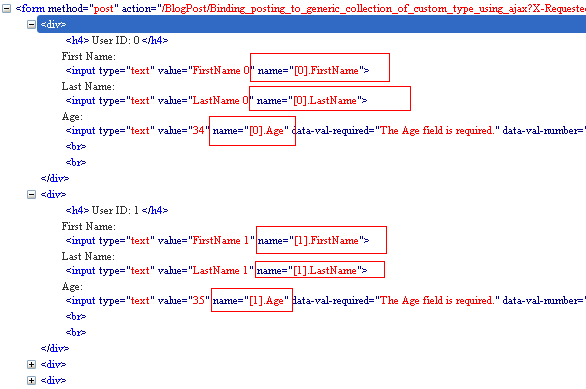
Now if we study the generated HTML by the view engine, we can see the pattern of HTML generation for the name attribute of the text boxes. Each property of a user object in the list got the name as [index].PropertyName. As we are binding to a collection, the default model binder will search for the values for the properties of the User class that are prefixed by an index. That's why the view engine is generating the name attribute of that fashion.

So, to pass the data using jQuery ajax we need to pass the querystring parameter of that fashion for model binder. So, first thing that can come to mind we will use traditional:true in the ajax call like in the previous post and ajax() method will internally use param() to build the querystring format for us. But as I have studied, jquery 1.7 version does not support for getting querystring format for array of complex object. That is if we execute the following code-
unescape($.param(
 [{FirstName:"FN 1", LastName:"LN 1", Age:35},
 {FirstName:"FN 2", LastName:"LN 2", Age:36},
 {FirstName:"FN 3", LastName:"LN 3", Age:37}]
 ))
we get the following result-
undefined=undefined&undefined=undefined&undefined=undefined
So, what we can do is write a little jQuery code and also use traditional:true of the ajax call to achieve this. The final jQuery code for doing this as below-
@model List<razor.Models.UserModel>
@for (int i = 0; i < Model.Count; i++)
{
    <div class="data">
        <h4>
            User ID: @Model[i].UserId</h4>
        First Name: @Html.TextBoxFor(m => m[i].FirstName)
        Last Name: @Html.TextBoxFor(m => m[i].LastName)
        Age: @Html.TextBoxFor(m => m[i].Age)
    </div> 
}
<input type="button" id="submitData" value="Submit data" />
<script type="text/javascript">
    $(document).ready(function () {
        $("#submitData").click(function () {
            var datatopost=new Object();
            $(".data").each(function (i, item) {
                datatopost["[" + i + "].FirstName"] = $(item).find("input[name*=FirstName]").val();
                datatopost["[" + i + "].LastName"] = $(item).find("input[name*=LastName]").val();
                datatopost["[" + i + "].Age"] = $(item).find("input[name*=Age]").val();
            });
            $.ajax({
                url: '@Url.Action("Binding_posting_to_generic_collection_of_custom_type_using_ajax")',
                type: 'POST',
                traditional: true,
                data: datatopost,
                dataType: "json",
                success: function (response) {
                    alert(response);
                },
                error: function (xhr) {
                    alert(xhr);
                }
            });
        });
    });
</script>
What we are doing here is looping through all the data and manually building a JavaScript object datatopost with properties like-
"[index].FirstName"
"[index].LastName"
"[index].Age"
So the actual assignment will be something like-
datatopost["[0].FirstName"]="First Name 0"
datatopost["[0].LastName"]="Last Name 0"
datatopost["[0].Age"]="35"

datatopost["[1].FirstName"]="First Name 1"
datatopost["[1].LastName"]="Last Name 1"
datatopost["[1].Age"]="36"

and so on...
Now we have our JavaScript object datatopost is ready, which is a plain JavaScript object with some properties. And now we can use traditional:true to automate the query string format.

Now we will be able to successfully post data from jQuery ajax. We can also see the data posted during the ajax request in the image below-


Note:
We can also change the logic of creation of datatopost like below-
$(".data").each(function (i, item) {
   datatopost[$(item).find("input[name*=FirstName]").attr("name")] = $(item).find("input[name*=FirstName]").val();
   datatopost[$(item).find("input[name*=LastName]").attr("name")] = $(item).find("input[name*=LastName]").val();
   datatopost[$(item).find("input[name*=Age]").attr("name")] = $(item).find("input[name*=Age]").val();
});

Wednesday, February 29, 2012

Posting list of text box values to array or list using MVC 3

Lets describe the problem with example. Lets have the following model and view-
    public class SampleDataModel
    {
        public string Data1 { get; set; }
        public string Data2 { get; set; }
        public string Data3 { get; set; }
        public string Data4 { get; set; }
        public string Data5 { get; set; }
        public string Data6 { get; set; }
    }
@model razor.Models.SampleDataModel

@using (Html.BeginForm())
{
    @Html.TextBoxFor(x => x.Data1) <br />   
    @Html.TextBoxFor(x => x.Data2)<br />
    @Html.TextBoxFor(x => x.Data3)<br />
    @Html.TextBoxFor(x => x.Data4)<br />
    @Html.TextBoxFor(x => x.Data5)<br />
    @Html.TextBoxFor(x => x.Data6)<br />
    <input type="submit" value="Submit data" />
}
Now if we have a controller action method like-
        [HttpPost]
        public ActionResult Posting_list_of_text_to_array_or_list(razor.Models.SampleDataModel data)
        {
            return PartialView("Success");
        }
Then data will get posted properly. Mow suppose in some case we need to post the data to a string array(string[]) or to generic list(List<string>), then how we can do that using the same view.

Its very simple. Lets first check the generated HTML for the view.
<form method="post" action=/BlogPost/Posting_list_of_text_to_array_or_list?X-Requested-With=XMLHttpRequest>
<input id="Data1" type="text" name="Data1"><br>
<input id="Data2" type="text" name="Data2"><br>
<input id="Data3" type="text" name="Data3"><br>
<input id="Data4" type="text" name="Data4"><br>
<input id="Data5" type="text" name="Data5"><br>
<input id="Data6" type="text" name="Data6"><br>
<input value="Submit data" type="submit">
</form>
If we see the HTML, the name of the input box is same as the id of the input box. There is one beauty of the default model binder in MVC 3 that if it finds some form fields with the same name then it try to convert it collection or array. So, we can achieve by changing the name of the input box to the parameter name of the controller action like below-
@model razor.Models.SampleDataModel

<script type="text/javascript">
    $(document).ready(function () {
        $(".similar").attr("name", "data");
    });
</script>

@using (Html.BeginForm())
{
    @Html.TextBoxFor(x => x.Data1, new { @class = "similar" }) <br />   
    @Html.TextBoxFor(x => x.Data2, new { @class = "similar" })<br />
    @Html.TextBoxFor(x => x.Data3, new { @class = "similar" })<br />
    @Html.TextBoxFor(x => x.Data4, new { @class = "similar" })<br />
    @Html.TextBoxFor(x => x.Data5, new { @class = "similar" })<br />
    @Html.TextBoxFor(x => x.Data6, new { @class = "similar" })<br />
    <input type="submit" value="Submit data" />
}
What is done here is simple. Added a CSS class to the text boxes and using jQuery we have set the name attribute of the text boxes to a same value. Now if we add a action method like-
        [HttpPost]
        public ActionResult Posting_list_of_text_to_array_or_list(List data)
        {
            return PartialView("Success");
        }
or
        [HttpPost]
        public ActionResult Posting_list_of_text_to_array_or_list(string[] data)
        {
            return PartialView("Success");
        }
The values of the text boxes will get posted without any issue.

Wednesday, February 1, 2012

Full Calendar with JSON data source using asp.net web service/ pagemethod/ webmethod

In this blog post we are going to discuss using full calendar plugin with JSON data source through asp.net webservice / pagemethod / webmethod. We can get the detail of the plugin here.

For using this plugin we need to add the reference of the following files-
    <script src="http://ajax.googleapis.com/ajax/libs/jquery/1.4.4/jquery.min.js" type="text/javascript"></script>
    <script src="http://ajax.googleapis.com/ajax/libs/jqueryui/1.8.6/jquery-ui.min.js" type="text/javascript"></script>
    <link rel='stylesheet' type='text/css' href='http://arshaw.com/js/fullcalendar-1.5.2/fullcalendar/fullcalendar.css' />
    <script type='text/javascript' src='http://arshaw.com/js/fullcalendar-1.5.2/jquery/jquery-ui-1.8.11.custom.min.js'></script>
    <script type='text/javascript' src='http://arshaw.com/js/fullcalendar-1.5.2/fullcalendar/fullcalendar.min.js'></script>
Basic style HTML infrastructure using for this implementation is as follows-
        #loading
        {
            width: 600px;
            height: 550px;
            position: absolute;
            background-color: gray;
            color: white;
            text-align: center;
            vertical-align: middle;
            display: table-cell;
        }
        #fullcal
        {
            width: 600px;
            height: 600px;
            position: absolute;
            display: none;
        }
    <div>
        <div id="loading">
            <label style="top: 50%; position: relative">
                loading events....</label>
        </div>
        <div id="fullcal">
        </div>
    </div>
In the div with id fullcal we will be loading the calendar control. By default this div is marked as hidden, and a place holder div (with id loading) is added in the place. This is just to show while server data is getting loaded from server. Once the data is loaded on the calendar we will show back the calendar and hide the placeholder.

The script used for activating calendar is as follows-
    $('div[id*=fullcal]').fullCalendar({
        header: {
            left: 'prev,next today',
            center: 'title',
            right: 'month,agendaWeek,agendaDay'
        },
        editable: true,
        events: list of event here
    });
Now in full calendar the event object has lots of information. We can get more information about the event object here. Lets represent the event as a C# class as follows-
public class Event
{
    public int EventID { get; set; }
    public string EventName { get; set; }
    public string StartDate { get; set; }
    public string EndDate { get; set; }
}
There are many other properties for the event object. For the sack of implementation we are taking these only. And I think the class properties are self explanatory. We can get the data for the event from database. For this post we are creating in memory object for data source. The page method used for data retrieval is as follows-
   [WebMethod]
    public List GetEvents()
    {
        List events = new List();
        events.Add(new Event()
        {
            EventID = 1,
            EventName = "EventName 1",
            StartDate = DateTime.Now.ToString("MM-dd-yyyy"),
            EndDate = DateTime.Now.AddDays(2).ToString("MM-dd-yyyy")
        });
        events.Add(new Event()
        {
            EventID = 2,
            EventName = "EventName 2",
            StartDate = DateTime.Now.AddDays(4).ToString("MM-dd-yyyy"),
            EndDate = DateTime.Now.AddDays(5).ToString("MM-dd-yyyy")
        });
        events.Add(new Event()
        {
            EventID = 3,
            EventName = "EventName 3",
            StartDate = DateTime.Now.AddDays(10).ToString("MM-dd-yyyy"),
            EndDate = DateTime.Now.AddDays(11).ToString("MM-dd-yyyy")
        });
        events.Add(new Event()
        {
            EventID = 4,
            EventName = "EventName 4",
            StartDate = DateTime.Now.AddDays(22).ToString("MM-dd-yyyy"),
            EndDate = DateTime.Now.AddDays(25).ToString("MM-dd-yyyy")
        });
        return events;
    }
Now we can read the web service data using jQuery and fill the full calendar using server driven event list like following-
    $.ajax({
        type: "POST",
        contentType: "application/json",
        data: "{}",
        url: "FullcalenderwithWebservice.asmx/GetEvents",
        dataType: "json",
        success: function(data) {
            $('div[id*=fullcal]').fullCalendar({
                header: {
                    left: 'prev,next today',
                    center: 'title',
                    right: 'month,agendaWeek,agendaDay'
                },
                editable: true,
                events: data.d
     });
            $("div[id=loading]").hide();
            $("div[id=fullcal]").show();
        },
        error: function(XMLHttpRequest, textStatus, errorThrown) {
            debugger;
        }
    });
Now here is a slight problem, the calendar will get loaded but not the list of events returned. Few points we need to remember here-
  1.  The full calendar event object has certain naming like EventID should be id, EventName – title, StartDate – start, EndDate – end and so on. So, we have to map the returned object to full calendar’s desired object.
  2. One more thing that we need to remember is that the start and end need to be in date type. The proper conversation is as follows-
    $('div[id*=fullcal]').fullCalendar({
        header: {
            left: 'prev,next today',
            center: 'title',
            right: 'month,agendaWeek,agendaDay'
        },
        editable: true,
        events: $.map(data.d, function(item, i) {
                    var event = new Object();
                    event.id = item.EventID;
                    event.start = new Date(item.StartDate);
                    event.end = new Date(item.EndDate);
                    event.title = item.EventName;
                    return event;
                })
    });
We can note one more thing that we are returning the date in MM-dd-yyyy format (DateTime.Now.ToString("MM-dd-yyyy")). The reason is that we can pass such a string to Date constructor in JavaScript to create the date.

We can download the full source code from here.

Sunday, January 22, 2012

POST complex data to pagemethod or webservice using jQuery

In many occasion we need to post some complex data like class (object), array, list of objects to pagemethod, webmethod or web service. I have answered many such posts in asp.net forum. So, decided to list few posts here-

http://forums.asp.net/p/1688559/4454363.aspx/1?Re+Post+array+of+array+of+html+form. This post is used to post generic list of a class objects where the UI is represented as UL, LI. Each LI has a checkbox, a hidden filed and an input box. The underlying structure of the class is as-
public class ComplexData {
    public int id { get; set; }
    public bool flag { get; set; }
    public string note { get; set; }
}
http://forums.asp.net/p/1709268/4549152.aspx/1?Re+how+to+save+data+using+jquery+ajex. This post is used to post name id based class where the UI is represented as HTML table. The class structure is as-
public class NameIDData
{
    public int id { get; set; }
    public string name { get; set; }
}
http://forums.asp.net/p/1690207/4462756.aspx/1?Re+Problem+with+charset+ajax+request. This post is used to post a class which contains non English characters. The class structure is as-
public class PersonClass
{
    public Guid Userid { get; set; }
    public string Firstname { get; set; }
    public string Lastname { get; set; }
    public string Username { get; set; }
}
And input sample data is as-
            var jsonString = { "Userid": "eec756aa-56e0-4515-b3bb-70b6c31b3d8a",
                "Firstname": "сркшы",
                "Lastname": "сркшы",
                "Username": "russiantest"
            };
http://forums.asp.net/p/1694914/4482943.aspx/1?Re+Getting+form+Values+. This post is used to post some complex data with parent child relationship. The UI is little complex with field set as each row of data. And the content can be added dynamically. The class is represented as-
public class ParentChild
{
    public string Parent { get; set; }
    public string Child { get; set; }
}
http://forums.asp.net/p/1662319/4338617.aspx. This post is used to post a list of object from reading Grid View rows. The class structure goes like-
public class Screening
{
    public string ScreeningPropertyID { get; set; }
    public string ScreeningValue { get; set; }
}
http://forums.asp.net/p/1653108/4303194.aspx#4303194. This post deals with posting a string array to webmethod.

http://forums.asp.net/p/1650626/4292348.aspx#4292348. This post deals with reordering of HTML element and post the reordered list to the webmethod. The class structure goes like below-
public class DivsDetail {
    public int DivID { get; set; }
    public int Order { get; set; }
}