Tuesday, October 30, 2012

Export HTML to excel using jQuery and asp.net

Here we will see how to export a HTML table content to excel using asp.net web form and C# using jQuery.

Let’s start with a small piece of code –
    <h2>
        Export to excel using jquery
    </h2>

    <a href="#" class="expToExcel">Export to excel</a>
    <div id="toReport">
    <table>
        <tr>
          <th>Name</th>
          <th>Age</th>
          <th>Email</th>
        </tr>
        <tr>
          <td>John</td>
          <td>44</td>
          <td>john@gmail.com</td>
        </tr>
        <tr>
          <td>Rambo</td>
          <td>33</td>
          <td>rambo@gmail.com</td>
        </tr>
        <tr>
          <td>It's hot</td>
          <td>33</td>
          <td>test@hotmail.com</td>
        </tr>
    </table>
    </div>
On click of "Export to excel" let do export the content to excel file using jQuery. We can do this in following steps-
  1. Get the HTML content.
  2. Encode the HTML content.
  3. Pass the HTML encoded content to an aspx page.
  4. Generate the excel file from code behind.
Step 1-
var data = $("#toReport").html();
data = escape(data);
Why we are escaping the HTML data and then passing to code behind. Answer is that we are going to pass the data to an aspx page using a dynamically created form. It is going to through "A potentially dangerous Request.Form value was detected from the client" error. That’s why we are escaping the HTML content.

Step 2-
$('body').prepend("<form method='post' action='exportPage.aspx' style='top:-3333333333px;' id='tempForm'><input type='hidden' name='data' value='" + data + "' ></form>");
$('#tempForm').submit();
$("tempForm").remove();
In this step we are adding an aspx page named exportPage.aspx. And creating a form tag on the fly, add the HTML data to a hidden field and submit the form using jQuery. And finally remove the added form tag.

Step 3 & 4-
        string data = Request.Form["data"];
        data = HttpUtility.UrlDecode(data);
        Response.Clear();
        Response.AddHeader("content-disposition", "attachment;filename=report.xls");
        Response.Charset = "";
        Response.ContentType = "application/excel";
        HttpContext.Current.Response.Write( data );
        HttpContext.Current.Response.Flush();
        HttpContext.Current.Response.End();
In this step we are simply creating the excel file and flushing the result as excel. You may see a message saying corrupt excel file do you want to open the file. You can open the file not an issue. I am too lazy to fine out proper setting.

You can also download the code from here.

Wednesday, October 3, 2012

Progress bar for long running process with steps using asp.net, C#, SignalR

I have come across with many questions regarding implementing progress of some long running operations in asp.net application. And I could not see any way to solve this problem directly in asp.net. Even with ajax call to get what step is running is not possible because once a long process has started, the server cannot listen to an ajax request until the previous step is finished. This is because the processing is done as a single thread.

Thanks to Microsoft for VS 2010 and SignalR.

Here we will try to implement a demo progress of long running application step by step using SignalR and visual studio 2010.

Step 1- Install signal R
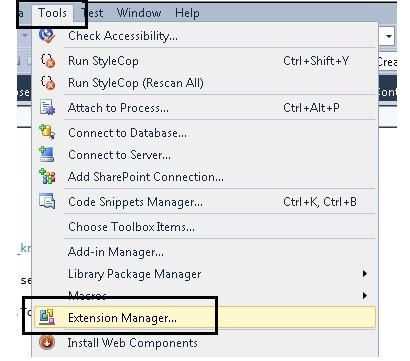
Check whether NuGet package manager is installed with your visual studio. If not go to tool -> Extension manager this will pop up the following window-


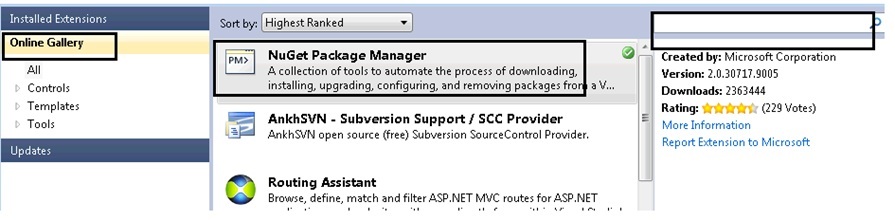
Go to online gallery, if you cannot see NuGet Package Manager, then search on the search box on the left side. Install it.

Create a web application with dot net framework 4, and then right click on the project and then click on Manage NuGet Packages… This will pop up the above window again like below-


Go to online then type signalr in the search box. This will list SignalR as the first item. Click on install.

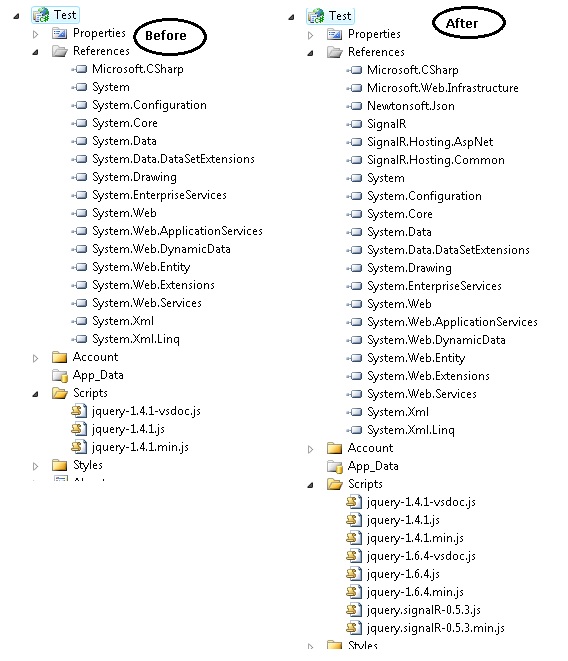
If you note down the reference of your project and the js file you can see the following difference-


Step 2-
First we will create a class named ServerComplexObjectand inherit this from SignalR.Hubs.Hub. And we will add a method named ComplexProcess() like below-
    public class ServerComplexObject:SignalR.Hubs.Hub {
        public void ComplexProcess()
        {
            System.Threading.Thread.Sleep(2000);
            Clients.AddProgress("Step 1 of 5 has completed.");
            System.Threading.Thread.Sleep(2000);
            Clients.AddProgress("Step 2 of 5 has completed.");
            System.Threading.Thread.Sleep(3000);
            Clients.AddProgress("Step 3  of 5 has completed.");
            System.Threading.Thread.Sleep(1000);
            Clients.AddProgress("Step 4 of 5 has completed.");
            System.Threading.Thread.Sleep(4000);
            Clients.AddProgress("Step 5 of 5 has completed.",true);
        }
    }
We have just used Sleep method of thread to simulate long running process. Here Clients is a dynamic property of Hub which represents all clients connected to the Hub. And AddProgress is a dynamic expression that will get invoked by the server. And a JavaScript method with exactly same name should be present in the client side.

Step 3-
Now to call this we have to take the reference of the appropriate JavaScript files and this are-
    <script src="Scripts/jquery-1.6.4.js" type="text/javascript"></script>
    <script src="Scripts/jquery.signalR-0.5.3.js" type="text/javascript"></script>
    <script src="signalr/hubs" type="text/javascript"></script>
Now we will have the following HTML-
    <div class="prgressBar" style="width:300px; padding-top:32px">
        <div class="bar" ></div>
    </div>
    <input id="btn" value="start process" type="button" />
In this first di is used to show the progress bar and the second button is used to start the process.

Step 4-
Now we have to do 4 steps to do the sample working-
  1. Create a proxy of the server object.
  2. Add a method with the same name "AddProgress".
  3. Start the hub for listening.
  4. And finally start the complex process from client.
And the code goes like below-
   <script type="text/javascript">
        var img = new Image();
        img.src = "https://cms.unov.org/FullTextSearch/Common/Images/progress.gif";
        $(document).ready(function () {
            var myConnection = $.connection.serverComplexObject;
            myConnection.AddProgress = function (message, completed) {
                $(".prgressBar .bar").html(message);
                if (completed) {
                    $(".prgressBar").removeClass("rotating");
                    $(".prgressBar .bar").html("process completed");
                }
            }
            $("#btn").click(function () {
                $(".prgressBar").addClass("rotating");
                myConnection.complexProcess();
            });
            $.connection.hub.start();
        });
    </script>
Let me list the above steps again
  1. Create a proxy of the server object.(var myConnection = $.connection.serverComplexObject;)
  2. Add a method with the same name "AddProgress".(myConnection.AddProgress = function (message, completed) {)
  3. Start the hub for listening.($.connection.hub.start();)
  4. And finally start the complex process from client.(myConnection.complexProcess();)
Now one thing you can note that serverComplexObject is same as the class name with first letter lowercased. Same is with complexProcess server method. That’s done. You can download the code to see the process in action.

Wednesday, September 26, 2012

To display the webpage again, the web browser needs to resend the information you’ve previously submitted.

To display the webpage again, Internet Explorer needs to resend the information you've previously submitted.
If you were making a purchase, you should click Cancel to avoid a duplicate transaction. Otherwise, click Retry to display the webpage again.


or

To display the webpage again, the web browser needs to resend the information you've previously submitted.
If you were making a purchase, you should click Cancel to avoid a duplicate transaction. Otherwise, click Retry to display the webpage again.


I was getting this a popup window in IE while working on an application and spent some time to resolve this issue. One page of my application was configured to reload information from server every three minutes. And there should not be any human interactions to the page as the page will a running one in a bug TV. But I was getting the above popup. One either has to click ok or cancel to proceed.

On little investigation I found that I was using window.location.reload() for reloading the page.

The answer is as follows-

The reload() method in IE is actually a post method and IE is showing this popup to avoid loss or resend of the information to the server. An easy solution is to replace this post with a get and it done with the following line-
window.location = window.location;

JavaScript date time localization e.g. central time to other time zone

Recently I had a requirement of doing JavaScript time localization. Problem statement goes like this-

"We have some data in central time (CST) in database. This data is basically a Gantt chart data. The database date time entry is there as CST because of the business lies in that region and there are many other business requirements. This data is presented as Gantt chart in web and people from many countries can see the chart and each one should see the data in their own localized time."

I have searched in web and could not get a direct content to the problem. So, thought to share the approach I have followed. We can solve this problem by following steps-
  1. Convert the source time to UTC time.
  2. And convert the UTC time to destination time.
Now for we need to be careful that whether the time zone has daylight-saving. As stated previously our source data in CST which is -06:00(offset) hours compared to UTC. In case of daylight saving its -05:00 hours. Let’s take a time 09/24/2012 14:00:00, this is a CST time. In this case the date falls under daylight-saving.

Now we need to get two things about the source system: - first- Date offset and second- is daylight-saving. As my IIS where the application is hosted is in CST time zone, we can get this information from application start event. Here I have decided to write the information to an xml file in the following format-
<TimeLocalization>
    <TimeOffset>-6.0</TimeOffset>
    <IsDayLight>True</IsDayLight>
</TimeLocalization>
So, in the Application_Start we can get this information.
XmlTextWriter myXmlWriterTime = new XmlTextWriter("file path", null);
myXmlWriterTime.Formatting = Formatting.Indented;
myXmlWriterTime.Indentation = 4;
myXmlWriterTime.WriteStartElement(Constants.TimeLocalization);
myXmlWriterTime.WriteElementString(Constants.TimeOffset, (DateTime.Now- DateTime.UtcNow).TotalHours.ToString());
myXmlWriterTime.WriteElementString(Constants.IsDayLight,DateTime.Now.IsDaylightSavingTime().ToString());
myXmlWriterTime.WriteEndElement();
myXmlWriterTime.Close();
In case of time offset it will always return -6.0 for CST now if the daylight-saving is true we need to add 1 resulting -5.0.

In the page load of the page where I am showing the Gantt chart, just doing a synchronous ajax call to read the value in JavaScript object like below-
$.ajax({
    type: "GET",
    url: "TimeOffset.xml",
    dataType: "xml",
    async: false,
    success: function (xml) {
        document.TimeOffset = parseFloat($(xml).find('TimeOffset').text());
        if ($(xml).find('IsDayLight').text() == "True")
            document.TimeOffset = document.TimeOffset + 1;
    },
    error: function () {
        alert("An error occurred while processing XML file.");
    }
});
Here it’s a specific case of CST. I have not tested where there is any time zone that needs a subtraction by 1.

I have created a function that will take a CST time and it will convert it to any time. In my case I am running the function from Indian time zone IST (+05:30). It goes like-
var cstArr;
function ConvertCSTTolocal(dateString) {
    //09/24/2012 14:00:00 CST
    debugger;
    cstArr = dateString.split(" ")[0].split("/");
    cstArr.push(dateString.split(" ")[1].split(":"))
    tmpDate = new Date(cstArr[2], parseInt(cstArr[0], 10) - 1, cstArr[1], cstArr[3][0], cstArr[3][1], cstArr[3][2]);
    tmpDate.setMinutes(tmpDate.getMinutes() - parseFloat(document.TimeOffset) * 60);

    tmpDate = tmpDate.toString().split(" ");
    tmpDate = tmpDate[0] + ", " + tmpDate[2] + " " + tmpDate[1] + " " + tmpDate[5] + " " + tmpDate[3] + " UTC";
    return new Date(tmpDate);
}
Now lets pass the input date to the function and see how the function goes. Our input is 09/24/2012 14:00:00 in CST. Lets investigate step by step-

Step1-
cstArr = dateString.split(" ")[0].split("/"); cstArr.push(dateString.split(" ")[1].split(":"))

With these lines we are simply splitting the date string in year, month, day, hours, minutes, and seconds. And it looks like-


Step2-
tmpDate = new Date(cstArr[2], parseInt(cstArr[0], 10) - 1, cstArr[1], cstArr[3][0], cstArr[3][1], cstArr[3][2]);

With these lines we are just passing the values to JavaScript Date function to create a date object. As I am in IST (+05:30) the resulting date is not the date as I have passed as input-


If you check the above date you can see it the same date and time as I have passed but UTC+05:30 is appended. Which means it’s the same time but in Indian time. If we convert this time to CST it will not be the same as passed input. But that’s not our intention. Our intention is to create a date and just add the offset to get the modified date and time.

Step3-
tmpDate.setMinutes(tmpDate.getMinutes() - parseFloat(document.TimeOffset) * 60);

With this line we are just negating the time zone offset of the central time (CST) to get the new time. Is it really giving the UTC time? Answer is no as explained earlier.

Step 4-


In the above image we can see the added time which is correct time with wrong offset. If we convert the input time 09/24/2012 14:00:00 to UTC, it will be 09/24/2012 19:00:00 in UTC time ( +5) considering daylight-saving. So, the problem is with the offset. If we see the UTC equivalent of the time using toUTCString method then we can see the UTC representation is coming like "day, date month year hour:min:sec UTC".

Step 5-
As the data are same except the time offset, we can prepare a UTC equivalent string from tmpDate like below-

tmpDate = tmpDate[0] + ", " + tmpDate[2] + " " + tmpDate[1] + " " + tmpDate[5] + " " + tmpDate[3] + " UTC";

this results the following-


This is the correct UTC value. Now if we pass this UTC string to a Date() function, it will result correct value for the current time zone. For example if we run this code in IST it will result the following-


Which is exactly the same value of we convert 09/24/2012 14:00:00 CST time to IST.

That’s it, problem solved.

Friday, September 14, 2012

Run a JavaScript function after asp.net client side validation is successful

There are some scenarios where we need to call some JavaScript code after the client side validation is successful and before the page is post back. We can do it easily. In asp.net while client validation it assigns a JavaScript variable Page_IsValid. If the validation is successful then it assign true else assign false. So we can trap the value of the variable to do your code execution. Hence let’s have the following code-
<html xmlns="http://www.w3.org/1999/xhtml">
<head runat="server">
    <title>Untitled Page</title>

    <script src="scripts/jquery.js" type="text/javascript"></script>
    <script type="text/javascript">
    function call(){
         if(Page_IsValid)
         {
            alert("alert page is value");
         }    
    }
    </script>
</head>
<body>
    <form id="form1" runat="server">
    <div>
        <asp:RequiredFieldValidator ID="RequiredFieldValidator1" runat="server" ErrorMessage="Required"
            ControlToValidate="TextBox1"></asp:RequiredFieldValidator>
        <asp:TextBox ID="TextBox1" runat="server"></asp:TextBox>
        <asp:Button ID="Button1" runat="server" Text="Button" OnClientClick="call();" />
    </div>
    </form>
</body>
</html>
But this code will not work. Reason is that the client click gets called before the page validation. We can solve this by two ways-

First-

In the above code we can explicitly call the client validation code. To do this we will just modify the call() JavaScript function like below-
    function call(){
        Page_ClientValidate();
         if(Page_IsValid)
         {
            alert("alert page is value");
         }    
    }
Here Page_ClientValidation() is explicitly calling the client validation. After this function is executed the value of Page_IsValid will get set to true /false. So, we are checking whether client validation is successful. If so call the alert method. We can replace this with our desired code.

Second-

After the client validation is done container form submit event is fired. We can trap the JavaScript submit event and do the same logic. For that let’s remove the OnClientClick from the button and then have the following JavaScript code-
    <script src="scripts/jquery.js" type="text/javascript"></script>
    <script type="text/javascript">
    $(document).ready(function(){
        $("#Button1").closest("form").submit(function(){
            if(Page_IsValid)
             {
                alert("alert page is value");
             }    
        });
    });
    </script>
And it’s done.

Monday, September 3, 2012

Radio button list with knockout.js

Below is a quick example of radio button list with knockout.js-
<script src="http://knockoutjs.com/js/knockout-2.1.0.js" type="text/javascript"></script>

<table>
    <tr>
        <td>
            <div data-bind="foreach: items">
                <input type="radio" name="items" data-bind="attr: { value: id }, checked: $root.selected" />
                <span data-bind="text: name"></span>
            </div>
            <div data-bind="text: selected">
            </div>
        </td>
    </tr>
</table>
<script type="text/javascript">
    function RadioButton(id, name, selected) {
        this.id = id;
        this.name = name;
        this.selected = selected;
    }
    function RadioModel() {
        var self=this;
        self.items= [
            new RadioButton(1, "first", true),
            new RadioButton(2, "two", false),
            new RadioButton(3, "three", false),
        ];
        self.selected = ko.observable();
        self.onSubmit= function () {
            var x = self.selected();
        }
    };
    var viewModel = new RadioModel();
    $(function () {
        ko.applyBindings(viewModel);
        var selected = ko.utils.arrayFirst(viewModel.items, function (item) { return item.selected; });
        viewModel.selected(selected.id);
    });
</script> 
We can check this in jsFiddle here.

Sunday, September 2, 2012

Check whether a function is registered or not to an event in JavaScript

This is a small and simple post to check whether a JavaScript function is registered to an event of a DOM element. For this example we will take a button and click event. We will associate two functions and then will check whether one a function is attached or not.

We will do this using getAttribute method of a DOM element to get the value of onclick attribute. Code goes like below-
<html xmlns="http://www.w3.org/1999/xhtml">
<head>
  <script type="text/javascript">
       function handlerFunction1() {
          alert("1");
      }
      function handlerFunction2() {
          alert("2");
      }
      function fn() {
           var functionArray = document.getElementById("test").getAttribute("onclick").split(",");
     for(var i=0; i<functionArray.length; i++)
     {
    if(functionArray[i].indexOf("handlerFunction1()")>=0)
     alert("function fn1() is registered with click me function");
     }
      }

  </script>
<title>
 </title></head>
<body>
    <form method="post" action="about show error message.aspx" id="form1">
    <input onclick="handlerFunction1(), handlerFunction2()" value="click me" type="button" id="test" />
    <a onclick="fn()" href="#">check fn1() is registered with click button</a>
    </form>
</body>
</html>
Now what if the event handlers are added dynamically with addEventListener/attachEvent, in that case the value of document.getElementById("test").getAttribute("onclick") will be null even if there are two functions registered to the event.

That reminds me some attribute or function like eventListenerList. But most of the browser does not support this now. It’s still a recommendation; you can check this here-

http://www.w3.org/TR/2001/WD-DOM-Level-3-Events-20010823/events.html#Events-EventListenerList

But we can implement something like below-
<html xmlns="http://www.w3.org/1999/xhtml">
<head>
  <script type="text/javascript">
       function handlerFunction1() {
          alert("1");
      }
      function handlerFunction2() {
          alert("2");
      }
      function fn() {
           var functionArray = document.getElementById("test").getAttribute("onclick");
     if(functionArray!=null)
    functionArray=functionArray.split(",");
     else
     {
    if(document.getElementById("test").eventListenerList!=null)
    functionArray= document.getElementById("test").eventListenerList["click"];
     }
     
     for(var i=0; i<functionArray.length; i++)
     {
    if(functionArray[i].indexOf("handlerFunction1()")>=0)
     alert("function fn1() is registered with click me function");
     }
      }
   function addEventHandler(elem,eventType,handler) {
  if(elem.eventListenerList==null)
   elem.eventListenerList=new Object();
  if(elem.eventListenerList[eventType]==null)
   elem.eventListenerList[eventType]=new Array();
  elem.eventListenerList[eventType].push(handler);
   if (elem.addEventListener)
    elem.addEventListener (eventType,handler,false);
   else if (elem.attachEvent)
    elem.attachEvent ('on'+eventType,handler); 
   }
   window.onload=function(){
  var btn= document.getElementById("test");
  addEventHandler(btn,"click",handlerFunction1);
  addEventHandler(btn,"click",handlerFunction2);
   }
  </script>
<title>
 </title></head>
<body>
    <form method="post" action="about show error message.aspx" id="form1">
    <input value="click me" type="button" id="test" />
    <a onclick="fn()" href="#">check fn1() is registered with click button</a>
    </form>
</body>
</html>
Following is a running snap shot.