Monday, August 4, 2014

Accessing derived class properties in the base class public method and creating dynamic queries

There are many ORM models that work on Object Relation Mapping. It generates queries on the fly based on the XML config file and reflection.

This post is intended to explain a simple scenario of how we can write a method like on a base class say ”save”, and any class that is derived from this base class should automatically call the save method, create a dynamic query and save the data on database.

Now let’s take a simple class named Person that has only two fields as below-
public class Person {
    public string FirstName { get; set; }
    public string LastName { get; set; }
}
And on doing the following code it should take the value from the instance “p”, create a dynamic query and save the data to database-
Person p = new Person() { FirstName="John", LastName="Smit" };
        p.save();
We can follow few steps for doing that.

Step 1 : Let’s create an class label attribute that will carry the name of the table for saving data in the database. It goes like this-
[System.AttributeUsage(System.AttributeTargets.Class )]
public class TableName : System.Attribute
{
    public string name;
    public TableName() 
    {
    }
    public TableName(string name)
    {
        this.name = name;
    }
}
Step 2 : is to create a base class that will implement a public method “save”. Ideally we should make this class as generic class as we need to access the property and the value of the properties. So, we can have this class as –
public class DBObjectwhere T:class { 
    public void save(){

        //implementation goes here
            
    }
}
So the inheritance will be below. Here we have added TableName attribute and tblPerson is the database table name-
[TableName(name="tblPerson")]
public class Person : DBObject {
    public string FirstName { get; set; }
    public string LastName { get; set; }
}
Step 3 : What we need to do in this step is five things.
  1. Get the name of the table
  2. Create comma separated table field name
  3. Create comma separated table field value to insert
  4. Create the query
  5. Do database call 

Step 3-1: We are passing type information to DBObject so we can get custom attribute(TableName) value through T like below-
 (typeof(T).GetCustomAttributes(false).FirstOrDefault() as TableName).Name
Step 3-2: We can get comma separated field names from T using reflection like below-
string.Join(",", (from p in typeof(T).GetProperties().AsEnumerable()
                                   select p.Name).ToArray());
Step 3-3: We can get comma separated field values from T using reflection like below-
string.Join(",", (from p in typeof(T).GetProperties().AsEnumerable()
                                   select "'"+ p.GetValue(this,null)+"'").ToArray());
Step 3-4: We can create final query as following-
string.Format("insert into {0} ({1}) values ({2})  ", attr.name, fields, values);
So the complete save method will look like below-
    public void save(){
        var attr = typeof(T).GetCustomAttributes(false).FirstOrDefault() as TableName;
        string fields, values;
        fields = string.Join(",", (from p in typeof(T).GetProperties().AsEnumerable()
                                   select p.Name).ToArray());
        values = string.Join(",", (from p in typeof(T).GetProperties().AsEnumerable()
                                   select "'"+ p.GetValue(this,null)+"'").ToArray());
        string query = string.Format("insert into {0} ({1}) values ({2})  ", attr.name, fields, values);
    }
Step 3-5: Variable query will finally result the following string for this example-
insert into tblPerson (FirstName,LastName) values ('John','Smit')  
This is the query we are looking for. I am not completing the data base call part.

How to upload multiple records in C# and stored procedure without looping

Recently I come across a question regarding how to save multiple records in sql server using C# and without using any loop.

Let’s take a simple case of saving list of persons. Let’s have the following class as person-

public class Person {
        public string PFirstName { get; set; }
        public string PLastName { get; set; }
        public int PAge { get; set; }
    }
Then let’s create a simple data base table called Person as below-
CREATE TABLE [dbo].[Person](
	[FirstName] [varchar](100) NULL,
	[LastName] [varchar](100) NULL,
	[Age] [int] NULL
) ON [PRIMARY] 
Now we can solve this problem by passing XML data as input to a stored procedure and using SQL XML for parsing data and saving to database.

So, let’s first create a list of persons for this example like below-
 List personList =new List(){
                new Person(){ PFirstName="abc", PLastName= "smit", PAge=32},
                new Person(){ PFirstName="bcd", PLastName= "pal", PAge=32}
            };
 
Now let’s parse this list to XML for saving and put it into a string variable-
 string SProc = "dbo.save_person_bulk";
            string ConnectonString = @"Data Source=(local);Initial Catalog=sample;Integrated Security=True;";
            using (SqlConnection sqlConnection = new SqlConnection(ConnectonString))
            {
                sqlConnection.Open();

                using (SqlCommand sqlCommand = new SqlCommand(SProc, sqlConnection))
                {
                    sqlCommand.CommandType = CommandType.StoredProcedure;
                    sqlCommand.Parameters.Add(new SqlParameter("@person_data", SqlDbType.VarChar)
                          {
                              Value = xmlPersonData
                          });
                    using (DataTable dataTable = new DataTable())
                    {
                        using (SqlDataAdapter sqlDataAdapter = new SqlDataAdapter())
                        {
                            sqlDataAdapter.SelectCommand = sqlCommand;
                            sqlDataAdapter.Fill(dataTable);
                        }
                    }
                }
            }
On doing the list parsing the resulting XML will look like this- Looking at the generated XML and the stored procedure the code is self explanatory.

Tuesday, May 14, 2013

Enterprise Library 6.0: The LogWriter has not been set for the Logger static class. Set it invoking the Logger.SetLogWriter method

A common approach to create a log entry using the following code-
LogEntry entry = new LogEntry();
entry.Message = "I am logging";
Logger.Write(entry);
This works fine with Enterprise Library 5.0. But in 6.0 it gives the error in the title. We can solve this by the following-
Logger.SetLogWriter(new LogWriterFactory().Create());
LogEntry entry = new LogEntry();
entry.Message = "I am logging";
Logger.Write(entry);
Or we can also try-
IConfigurationSource configurationSource = ConfigurationSourceFactory.Create();
LogWriterFactory logWriterFactory = new LogWriterFactory(configurationSource);
Logger.SetLogWriter(logWriterFactory.Create());
LogEntry entry = new LogEntry();
entry.Message = "I am logging";
Logger.Write(entry);

Tuesday, December 11, 2012

Run some VBA code when excel opens

This is a very simple post describes how to run some code when excel opens.

Excel always runs a subroutine named Auto_Open() when excel opens. Simple we can use this subroutine to do the job.

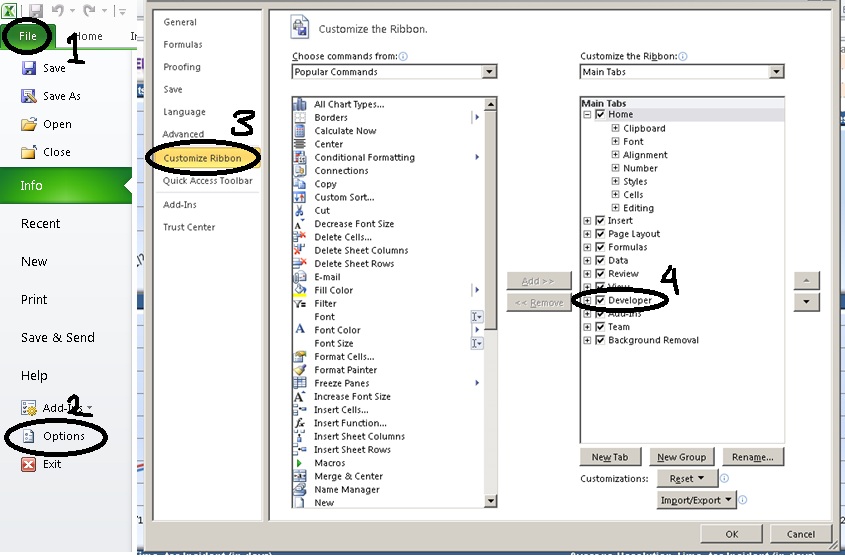
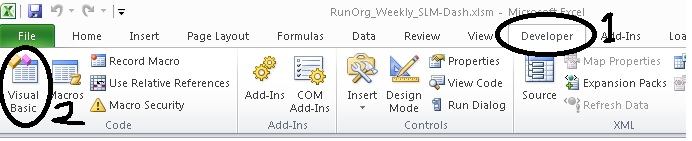
Go to developer tab then click visual basic button. If you cannot locate developer tool then you can enable developer tab by looking into the image below-


After enabling go to developer tab and then click on visual basic button. This will open visual basic editor.


Paste the following code and save the excel file. Close the file and open again. You can see the alert message as soon as the file opens-
Sub Auto_Open()
    MsgBox "The file is open now"
End Sub
Download the sample excel 2010 file here.

Monday, November 26, 2012

Asp.net validation add text background color

Following is code for adding background color to the text box if validation fails in asp.net web form-

<html xmlns="http://www.w3.org/1999/xhtml">
<head runat="server">
    <title></title>
</head>
<body>
    <form id="form1" runat="server">
    <asp:TextBox ID="txtOne" runat="server" />
      <asp:RequiredFieldValidator ID="rfv" runat="server" 
                                 ControlToValidate="txtOne" Text="" />
      <asp:TextBox ID="txtTwo" runat="server" />
      <asp:RequiredFieldValidator ID="rfv2" runat="server" 
                                 ControlToValidate="txtTwo" Text="" />
      <asp:Button ID="btnOne" runat="server" OnClientClick="return BtnClick();" 
                                         Text="Click" CausesValidation="true" />
   <script type="text/javascript">
       function BtnClick() {
            var val = Page_ClientValidate();
            if (!val) {
                var i = 0;
                for (; i < Page_Validators.length; i++) {
                    if (!Page_Validators[i].isvalid) {
                        $("#" + Page_Validators[i].controltovalidate)
                         .css("background-color", "red");
                    }
                }
            }
            return val;
        }
    </script>
    </form>
</body>
</html>


Wednesday, November 7, 2012

Export PDF using jQuery and generic handler in asp.net

Recently I have added a post regarding Export HTML to excel using jQuery and asp.net. Here I am repeating the same for PDF. I will suggest you to go through the previous post as I am not explaining repeating technical aspects.

Let’s directly check the following HTML code-
<html xmlns="http://www.w3.org/1999/xhtml">
<head runat="server">
<script src="http://ajax.aspnetcdn.com/ajax/jQuery/jquery-1.7.js" type="text/javascript"></script>
<script type="text/javascript">
    $(document).ready(function() { 
        $(".expPDF").click(function(){
            var someDummyParameter="test";
            $('body').prepend("<form method='post' action='GetPDF.ashx' style='top:-3333333333px;' id='tempForm'><input type='hidden' name='data' value='" + someDummyParameter + "' ></form>");
            $('#tempForm').submit();
            $("tempForm").remove();
        });
    });
</script>
</head>
<body>
    <form id="form1" runat="server">
    <a href="#" target="_blank" class="expPDF">Export to pdf</a>
    </form>
</body>
</html>
The above code is simple. We are having a simple anchor(a) as a button to lunch the PDF. On the click of the anchor we are creating a form tag on the fly, assigning the action to a generic handler that will create the PDF file. At the end we are submitting the form. On the form submit the form will get posted to generic handler. In this example we are also passing some dummy data as hidden filed which will be accessible in the handler code. Likewise we need some additional information we can pass form elements.

Now let’s define the handler code. In the handler we can create the PDF file using some library like itextsharp or something similar. But in this example we are just reading PDF file from the memory the memory. Code is like this-
<%@ WebHandler Language="C#" Class="GetPDF" %>

using System;
using System.Web;

public class GetPDF : IHttpHandler {
    
    public void ProcessRequest (HttpContext context) {
                
        string inputData = context.Request.Form["data"];
        
        byte[] buffer;
        using (System.IO.FileStream fileStream = new System.IO.FileStream(@"E:\ForumPosts\jQueryPDF\" + inputData + ".pdf", System.IO.FileMode.Open, System.IO.FileAccess.Read, System.IO.FileShare.Read))
        using (System.IO.BinaryReader reader = new System.IO.BinaryReader(fileStream))
        {
            buffer = reader.ReadBytes((int)reader.BaseStream.Length);
        }
        context.Response.ContentType = "application/pdf";
        context.Response.AddHeader("Content-Length", buffer.Length.ToString());
        context.Response.AppendHeader("content-disposition", "inline; filename=test.pdf"); 
        context.Response.BinaryWrite(buffer);
        context.Response.End(); 
    }
 
    public bool IsReusable {
        get {
            return false;
        }
    }

}
As you can see the first line in the handler ProcessRequest function we are accessing the form data passed string inputData = context.Request.Form["data"];. The remaining code is self-explanatory. The PDF file path I have hard coded according to my folder structure.

You can download the code form here.

Tuesday, October 30, 2012

Export HTML to excel using jQuery and asp.net

Here we will see how to export a HTML table content to excel using asp.net web form and C# using jQuery.

Let’s start with a small piece of code –
    <h2>
        Export to excel using jquery
    </h2>

    <a href="#" class="expToExcel">Export to excel</a>
    <div id="toReport">
    <table>
        <tr>
          <th>Name</th>
          <th>Age</th>
          <th>Email</th>
        </tr>
        <tr>
          <td>John</td>
          <td>44</td>
          <td>john@gmail.com</td>
        </tr>
        <tr>
          <td>Rambo</td>
          <td>33</td>
          <td>rambo@gmail.com</td>
        </tr>
        <tr>
          <td>It's hot</td>
          <td>33</td>
          <td>test@hotmail.com</td>
        </tr>
    </table>
    </div>
On click of "Export to excel" let do export the content to excel file using jQuery. We can do this in following steps-
  1. Get the HTML content.
  2. Encode the HTML content.
  3. Pass the HTML encoded content to an aspx page.
  4. Generate the excel file from code behind.
Step 1-
var data = $("#toReport").html();
data = escape(data);
Why we are escaping the HTML data and then passing to code behind. Answer is that we are going to pass the data to an aspx page using a dynamically created form. It is going to through "A potentially dangerous Request.Form value was detected from the client" error. That’s why we are escaping the HTML content.

Step 2-
$('body').prepend("<form method='post' action='exportPage.aspx' style='top:-3333333333px;' id='tempForm'><input type='hidden' name='data' value='" + data + "' ></form>");
$('#tempForm').submit();
$("tempForm").remove();
In this step we are adding an aspx page named exportPage.aspx. And creating a form tag on the fly, add the HTML data to a hidden field and submit the form using jQuery. And finally remove the added form tag.

Step 3 & 4-
        string data = Request.Form["data"];
        data = HttpUtility.UrlDecode(data);
        Response.Clear();
        Response.AddHeader("content-disposition", "attachment;filename=report.xls");
        Response.Charset = "";
        Response.ContentType = "application/excel";
        HttpContext.Current.Response.Write( data );
        HttpContext.Current.Response.Flush();
        HttpContext.Current.Response.End();
In this step we are simply creating the excel file and flushing the result as excel. You may see a message saying corrupt excel file do you want to open the file. You can open the file not an issue. I am too lazy to fine out proper setting.

You can also download the code from here.